At a glance
- Takes
- Any payload
- Emits
- timerName on start; durationMs and durationFormatted on stop
- Good for
- Finding the slow node in a flow you thought was fast
Set it up
Put a Timer in Start mode before the stretch you care about and a second one in Stop mode after it. Name the first; the second picks it from the menu of running timers. Both cards show the measured duration as a badge — during the run and when you open it from history.
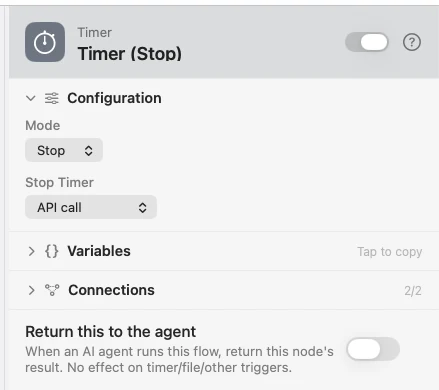
Configure
| Field | Default | What it does |
|---|---|---|
| Mode | Start | Start or Stop. |
| Timer Name | Timer 1 | The name this timer runs under. Shown in Start mode. |
| Stop Timer | — | Which running timer to stop. Shown in Stop mode. |
Output
Every key is available downstream as {{key}}.
| Key | Mode | Value |
|---|---|---|
timerName | Both | The timer that was started or stopped |
durationMs | Stop | Elapsed milliseconds, whole |
durationFormatted | Stop | Human-readable: 420ms, 1.2s, 2m 5s |
The start stamp itself rides the payload as _timer_<name>, which is how the Stop node finds it.
Example: time an API call
Timer (Start) marks the beginning. API Request runs. Timer (Stop) reports {{durationFormatted}}, and Log records it.
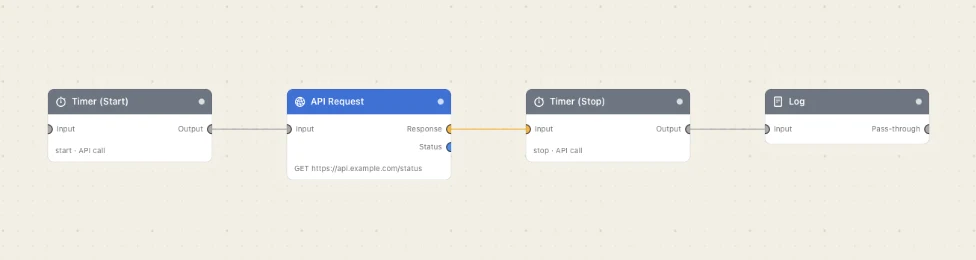
Paste this into the Flow Builder to get the same flow:
Start a timer, call an API, stop the timer, and log how long it took.
Good to know
The Stop node fails if the timer never started. It needs the start stamp on its own input, so the two nodes must be on the same path — a Stop on a branch the Start didn't reach has nothing to measure.
A Stop with no name picks the first timer on the payload, which is what you want when there is only one.
A manual run animates the flow, holding each card on screen briefly, and that pacing is inside the measurement. Trigger-fired background runs measure pure execution time.