At a glance
- Does
- Renders the content template and writes it to disk
- Emits
- filePath, fileSize, written
- Works with
- Any path outside the protected locations
Set it up
Give it a File Path and the Content. Both take {{variable}}. Overwrite replaces the file, Append adds to the end, and Create Directories makes any missing folders in the path.
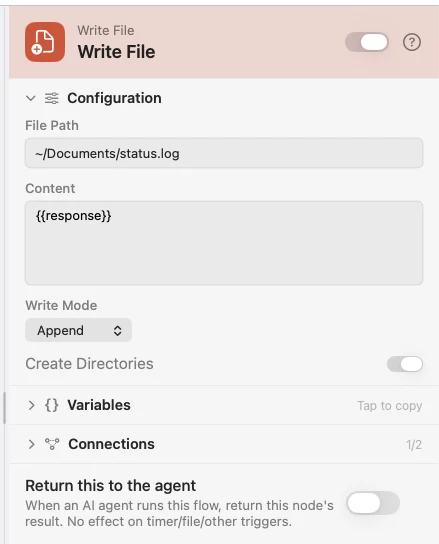
Configure
| Field | Default | What it does |
|---|---|---|
| File Path | — | Where to write. Supports {{variable}}. |
| Content | — | What to write. Supports {{variable}}. |
| Write Mode | Overwrite | Overwrite replaces the file; Append adds to the end. |
| Create Directories | On | Make any missing folders in the path. |
Output
Every key is available downstream as {{key}}.
| Key | Type | Value |
|---|---|---|
filePath | String | Absolute path to the file that was written |
fileSize | Number | Size in bytes after the write |
written | Boolean | Whether the write succeeded |
Example: save the API response every hour
Schedule fires hourly, API Request fetches, and Write File appends the response to a rolling file.
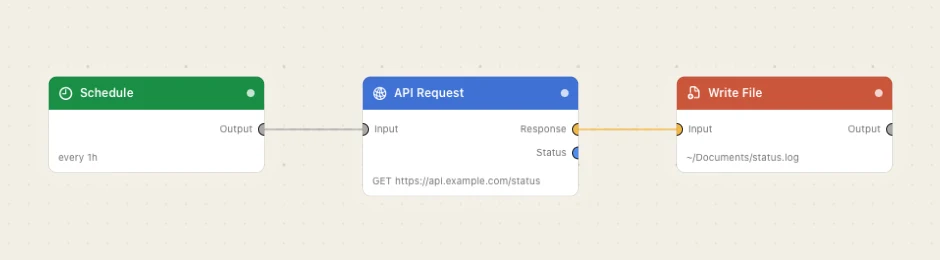
Paste this into the Flow Builder to get the same flow:
Every hour, call https://api.example.com/status and append the response to ~/Documents/status.log.
Good to know
Overwrite is not recoverable. The previous contents are replaced outright; nothing goes to the Trash. A flow set that way asks for confirmation every time it is armed.
For one line per run, use Log to File. Log to File appends JSON Lines, CSV or a template you write, and counts the lines for you.