At a glance
- Does
- Reads today, tomorrow, the next N hours, or the next N days
- Emits
- events, eventCount, eventsText, rangeStartISO, rangeEndISO
- Needs
- Full Calendars access, asked for on first run
Set it up
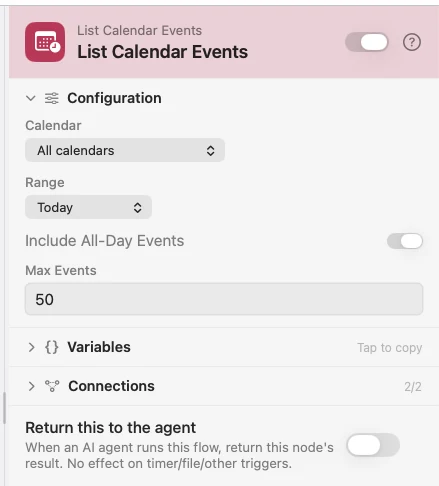
Pick a Range and, if you want one calendar rather than all of them, a Calendar. The node emits two views of the same read: events, a real array sorted by start time, and eventsText, one formatted line per event ready to drop into a template or a prompt.
Each event carries title, startISO, endISO, isAllDay, location, calendarName, eventID and notes — every key present on every event, empty rather than missing. That is the same shape the Calendar Event (Apple) trigger and Add to Calendar use.
Configure
| Field | Default | What it does |
|---|---|---|
| Calendar | All calendars | Which calendar to read. Blank reads every one. |
| Range | Today | Today, Tomorrow, Next N hours, or Next N days. |
| Hours | 8 | Size of the window when Range is Next N hours. |
| Days | 7 | Size of the window when Range is Next N days. |
| Include All-Day Events | On | Off drops all-day entries from the result. |
| Max Events | 50 | Cap applied after sorting by start time. 0 means no cap. |
Output
Every key is available downstream as {{key}}.
| Key | Type | Value |
|---|---|---|
events | Array | Every event in the window, sorted by start time. Empty array when nothing is on |
events.0.title | String | Title of the first event; each event also has startISO, endISO, isAllDay, location, calendarName, eventID, notes |
eventCount | Number | How many events the window returned |
eventsText | String | One line per event, e.g. 9:00 AM – 9:30 AM Standup (Work). Reads No events. when the window is empty |
rangeStartISO | String | ISO 8601 start of the window that was read |
rangeEndISO | String | ISO 8601 end of the window that was read |
Example: a morning briefing card
Schedule fires at 8:45 on weekdays. List Calendar Events reads today. HTML Template builds a card from {{eventsText}}. HTML View floats it on the desktop until you click Got it.
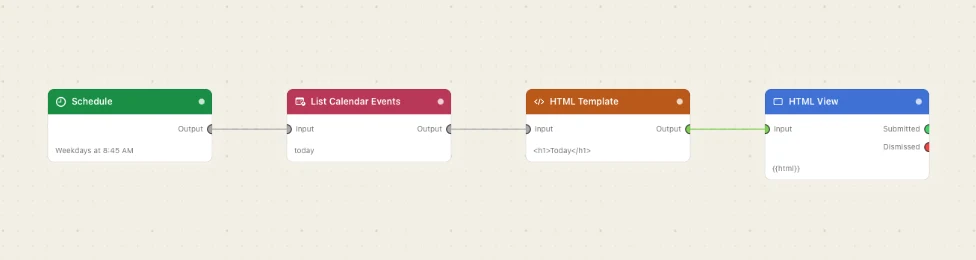
Paste this into the Flow Builder to get the same flow:
At 8:45 every weekday, read today's calendar and show me the day as a floating card with a Got it button.
Good to know
Full Calendars access is required. macOS asks the first time the node runs. If you said no, switch Watchflows on under System Settings → Privacy & Security → Calendars — the node cannot prompt twice.
eventsText is built for prompts. It is already a readable agenda, so an AI Prompt summarising the day needs nothing more than that one key. Reach for events when you want to loop, filter or branch on individual entries.