At a glance
- Emits
- response, status
- Response is
- Real structure when the body is JSON — reach into it with response.field
Set it up
Choose a method, write the URL, add headers or an auth scheme. Every text field takes {{...}}, so the URL and body can be built from whatever arrived.
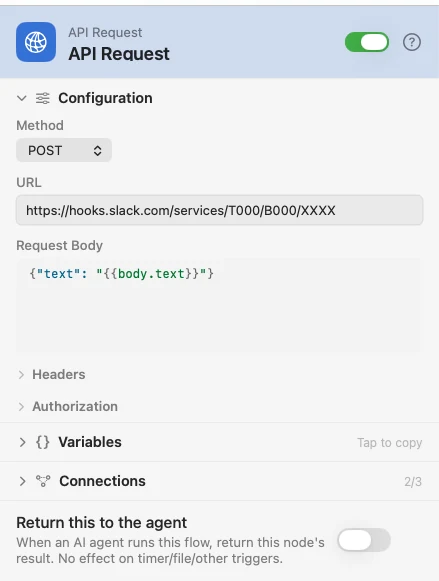
Configure
| Field | Default | What it does |
|---|---|---|
| Method | GET | GET, POST, PUT, PATCH or DELETE. |
| URL | — | The endpoint. Supports {{var}}. |
| Request Body | — | JSON to send. Hidden for GET. |
| Headers | — | Key-value pairs added to the request. |
| Auth Type | None | None, Basic Auth, Bearer Token or API Key. |
| Username / Password | — | Shown for Basic Auth. |
| Token | — | Shown for Bearer Token. |
| Key Name / Key Value / Add to | — | Shown for API Key. Add to puts the key in a header or on the query string. |
Output
| Key | Type | Value |
|---|---|---|
response | JSON or String | The parsed body — a navigable object or array when it is JSON, otherwise the raw text |
status | Number | The HTTP status code |
Response and Status are separate outlets too, so a Compare can branch on the status without touching the body.
Example: post to Slack when a webhook arrives
A webhook hands the message through, API Request POSTs it, and a Notification reports the status code.
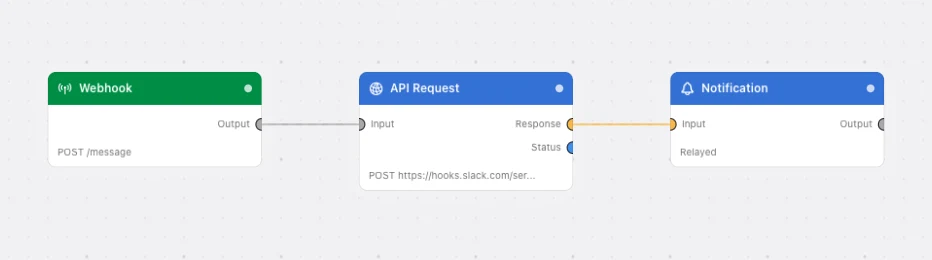
Paste this into the Flow Builder to get the same flow:
When a webhook fires, POST its text to a Slack incoming webhook URL and notify me with the status code.
Good to know
DELETE marks the node destructive — and only DELETE. There is no heuristic for a POST or PUT that happens to remove something, so a destructive write behind another verb is yours to know about.
JSON stays JSON. {{response.items.0.id}} resolves, and a For Each can loop response.items directly.