At a glance
- Does
- Create Note, Append to Note, or Search Notes
- Emits
- noteTitle, noteBody, noteFolder, noteID, created, appended, results, count
- Needs
- Permission to control Notes, asked for on first run
Set it up
Pick the Operation and the inspector shows only that operation's fields. Every text field takes {{variable}}.
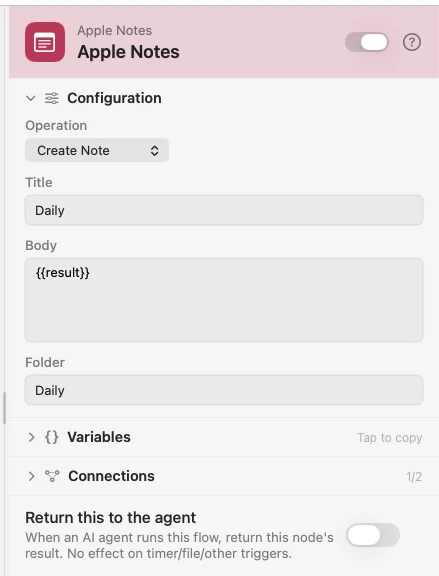
Create writes a new note, making the folder if it is not there yet; blank means Notes. Append adds to the end of an existing note, found by exact name. Search returns the matches as a real array you can walk with {{results.0.title}}.
Configure
| Field | Default | What it does |
|---|---|---|
| Operation | Create Note | Create Note, Append to Note, or Search Notes. |
| Title | — | Create: the note's title. |
| Body | — | Create: its contents. |
| Folder | Notes | Create: which folder; made if missing. |
| Note Name | — | Append: the exact name to add to. |
| Content to Append | — | Append: what to add. |
| Search Query | — | Search: matched against note names. |
| Folder | All folders | Search: limit to one folder. |
| Max Results | 5 | Search: how many to bring back. |
Output
Every key is available downstream as {{key}}.
| Key | Type | Value |
|---|---|---|
noteTitle | String | Title of the note created or appended to |
noteBody | String | Create: the body written |
noteFolder | String | Create: the folder it went into |
noteID | String | Create: Apple Notes identifier |
created | Boolean | True after a Create Note |
appended | Boolean | True after an Append to Note |
results | Array | Search: one object per match — title, snippet, folder, id |
count | Number | Search: how many matched |
Example: file the day's AI summary
Schedule fires at 6pm. List Calendar Events reads today, an AI node writes the summary, and Apple Notes files it under a Daily folder.
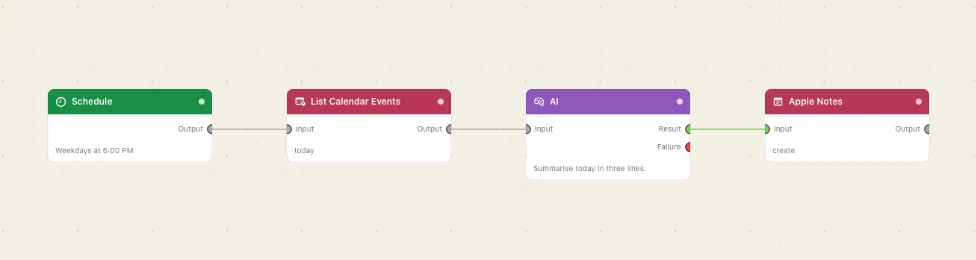
Paste this into the Flow Builder to get the same flow:
Every weekday at 6pm, summarise today's calendar with AI and save it as a note in a folder called Daily.
Good to know
Notes is driven through AppleScript. The first run raises a macOS prompt asking to control Notes. Dismiss it and you turn Watchflows on again under System Settings → Privacy & Security → Automation.
Append needs an exact name. A near miss is an error, not a new note — pair it with a Create step for the first run.
Search matches names, not bodies. Each result carries a 200-character snippet, usually enough to feed an AI node without opening anything.