At a glance
- Does
- Lists the apps in the folders you name, plus any extra rows of your own
- Emits
- records, count
- Needs
- Nothing — no permission prompt, no network
Set it up
Drop it in front of a Pick from List and you have an app launcher. The picker recognises a column of .app paths and uses it as the thumbnail on its own, so every row shows the app's real icon — or point Thumbnail Column at path explicitly.
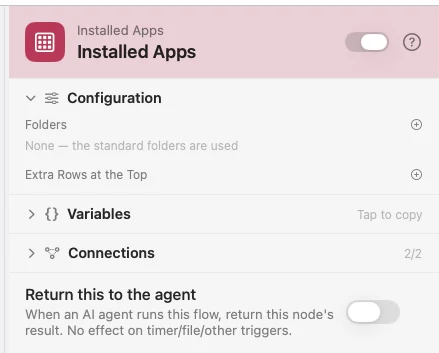
It is instant. The catalogue is walked once and held in memory; each run checks the folders' modification dates and walks again only when something changed. Nothing is rendered or written to disk at run time, and nothing looks inside an app bundle for helpers.
Extra Rows at the Top puts entries of your own above the apps, each with kind set to custom — so a Condition on {{selected.kind}} tells your rows from real apps.
Configure
| Field | Default | What it does |
|---|---|---|
| Folders | /Applications, /System/Applications, /System/Library/CoreServices/Applications, ~/Applications | The folders to scan, subfolders included. An empty list falls back to these four. |
| Extra Rows at the Top | — | Names placed above the apps, one per row. |
Output
Every key is available downstream as {{key}}.
| Key | Type | Value |
|---|---|---|
records | Array | Extra rows first with kind custom, then one {name, path, bundleID, kind} row per app, sorted by name |
count | Number | How many rows records holds |
Example: an app launcher on a hotkey
Keyboard Shortcut fires, Installed Apps builds the rows, Pick from List floats a chooser, and Open File launches what you picked.
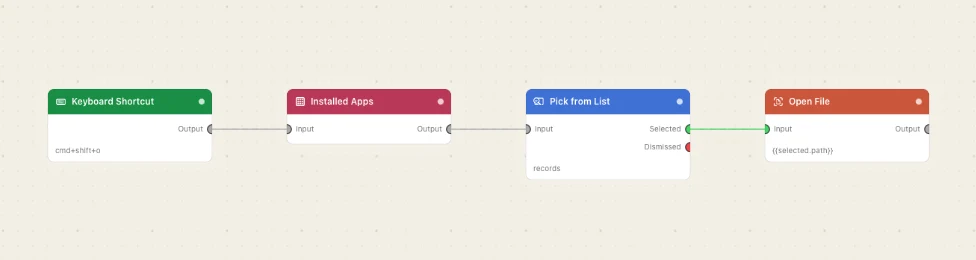
Paste this into the Flow Builder to get the same flow:
On a keyboard shortcut, show me a searchable list of my installed apps and open the one I pick.
Good to know
records is the key Pick from List expects. It is that node's default Rows field, so the two wire together with nothing to configure.
Extra rows are how a launcher launches a flow. Add your own flow's name, branch on {{selected.kind}} being custom, and send it to a Run Watchflow instead of Open File.