At a glance
- Fires when
- Every poll interval, from 1 second to 5 minutes
- Emits
- metric, value, timestamp, plus the keys for the metric you chose
- Good for
- Live dashboards, low-disk and low-battery alerts, health logging
Set it up
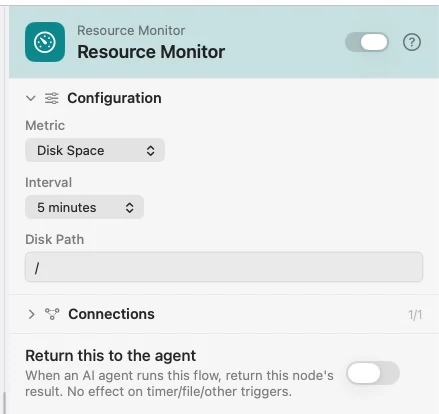
Choose the metric and how often to sample it. Each metric fills a different set of keys, and value always holds the number for whichever one you picked — that is the key to wire into a Condition when you only care about the threshold.
Configure
| Field | Default | What it does |
|---|---|---|
| Metric | CPU Usage | CPU Usage, Memory Usage, Disk Space, or Battery Level. |
| Interval | 5 seconds | 1s, 2s, 5s, 10s, 30s, 1 minute, or 5 minutes. |
| Disk Path | / | Which volume to measure. Appears only for Disk Space. |
Output
Every key is available downstream as {{key}}.
| Key | Metric | Value |
|---|---|---|
metric | all | Which metric this sample is — cpu_usage, memory_usage, disk_space, battery_level |
value | all | The metric's number for this sample, whichever metric you chose |
timestamp | all | ISO 8601 |
cpuUsage | CPU | Percentage |
memoryUsage | Memory | Percentage |
usedGB | Memory | Memory in use |
totalGB | Memory, Disk | Total capacity |
usedPercent | Disk | Percentage of the volume used |
freeGB | Disk | Space left |
path | Disk | The volume that was measured |
batteryLevel | Battery | Percentage |
isCharging | Battery | Whether it is plugged in |
Example: warn when the disk fills up
Resource Monitor samples Disk Space every five minutes. Condition asks whether {{value}} is greater than 90. Yes goes to Notification.
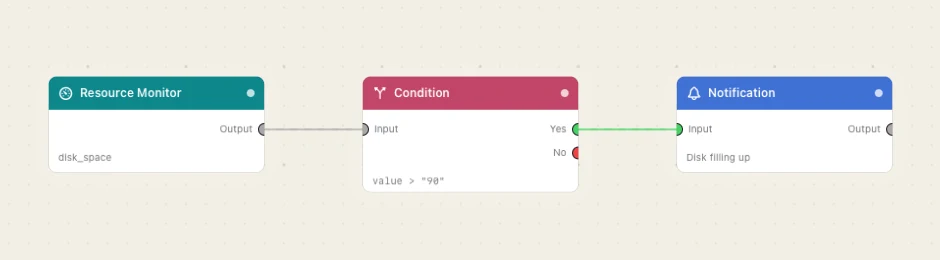
Paste this into the Flow Builder to get the same flow:
Check my startup disk every five minutes and notify me when it is more than 90% full.
Good to know
value is the metric-agnostic number. It mirrors cpuUsage, memoryUsage, usedPercent or batteryLevel depending on the metric, so you can change the metric without rewiring the Condition downstream.
The flow streams from ▶, not from the Enabled toggle. An emitter-only flow is never armed by enabling it or by launching the app. Press ▶ on the canvas to start, ■ to stop.
Several emitters in one flow all stream. Pressing ▶ starts every enabled emitter on the canvas, unless the run-target switcher has scoped the Play to one chain.