At a glance
- Does
- Create Reminder, List Reminders, Mark Complete, or List Lists
- Emits
- reminderTitle, reminderList, dueDate, notes, reminderID, created, results, count, completed, lists
- Needs
- Permission to control Reminders, granted on first run
Set it up
Pick the Operation and the inspector shows only that operation's fields. Every text field takes {{variable}}.
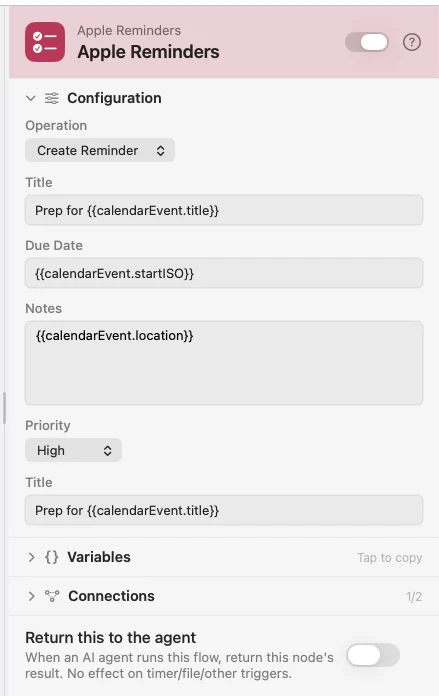
Create makes the list if it does not exist. Due Date is passed to Reminders as written — a string macOS reads as a date, like 4/10/2026 3:00 PM. Mark Complete finds the reminder by title within a list, and switching Mark as Complete off un-completes it instead.
All four operations are also an Agent tool (apple_reminders), so an agent can manage reminders mid-run.
Configure
| Field | Default | What it does |
|---|---|---|
| Operation | Create Reminder | Create Reminder, List Reminders, Mark Complete, or List Lists. |
| Title | — | Create: the reminder's title. Required. |
| List | Reminders | Create, List, Mark Complete: which list. Created if missing. |
| Due Date | — | Create: a date string Reminders can parse. |
| Notes | — | Create: body text. |
| Priority | None | Create: None, High, Medium, or Low. |
| Show Completed | Off | List: return completed reminders instead of open ones. |
| Max Results | 10 | List: how many to bring back. |
| Reminder Title | — | Mark Complete: the title to find. |
| Mark as Complete | On | Mark Complete: off marks it incomplete again. |
Output
Every key is available downstream as {{key}}.
| Key | Type | Value |
|---|---|---|
reminderTitle | String | Title of the reminder created or marked |
reminderList | String | The list it belongs to |
dueDate | String | Due date as it was given |
notes | String | Body text |
reminderID | String | Apple Reminders identifier |
created | Boolean | True after a Create Reminder |
results | Array | List: one object per reminder, each with title, dueDate and priority |
count | Number | How many rows came back |
completed | Boolean | Mark Complete: the state it was set to |
lists | Array | List Lists: every list name on this Mac |
Example: a prep task for every new meeting
Calendar Event (Apple) fires when an event is created. Apple Reminders files a prep task in a Today list, due when the meeting starts.
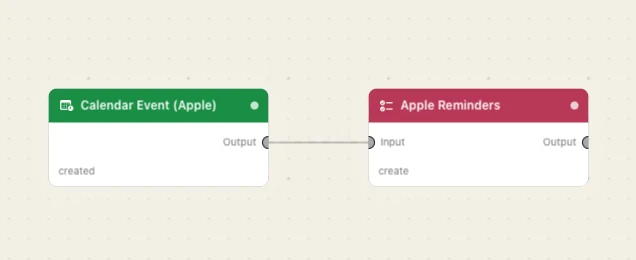
Paste this into the Flow Builder to get the same flow:
When a new event is added to my calendar, create a high-priority reminder in my Today list called "Prep for" the event, due when it starts.
Good to know
Reminders is driven through AppleScript. The first run raises a macOS prompt asking to control Reminders. Dismiss it and you turn Watchflows on again under System Settings → Privacy & Security → Automation.
A missing list is created, not an error. Which also means a typo quietly makes a second list.
Mark Complete matches on title. Give reminders distinct names when a flow will be ticking them off.