At a glance
- Emits
- notified, title, body
- Not the same as
- Notification Prompt, which stops and waits for a reply
Set it up
Write the title and body with {{...}} for anything upstream. An Action URL makes the notification clickable — a web address opens in the browser, a file path in Finder.
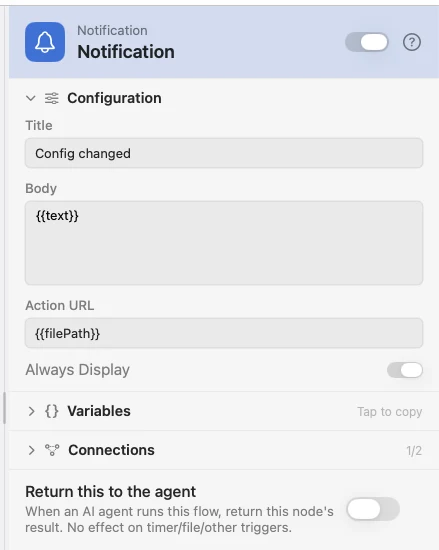
Configure
| Field | Default | What it does |
|---|---|---|
| Title | — | The bold first line. Supports {{var}}. |
| Body | — | The message under it. Supports {{var}}. |
| Action URL | — | Opened when you click the notification. A URL or a file path. |
| Always Display | On | Posts as time-sensitive, so it shows during a Focus. |
Output
| Key | Type | Value |
|---|---|---|
notified | Boolean | Whether the notification was posted |
title | String | The title after {{...}} resolved |
body | String | The body after {{...}} resolved |
Example: say which file changed
File Changed watches a config file, Template writes the sentence, Notification shows it.
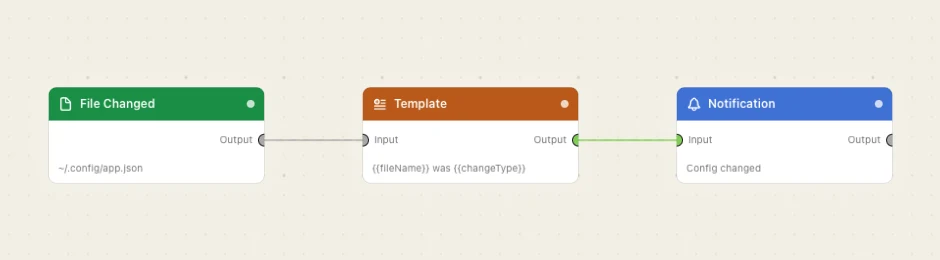
Paste this into the Flow Builder to get the same flow:
Watch ~/.config/app.json and notify me which file changed and how.
Good to know
This node replaces the payload rather than adding to it. Only notified, title and body come out, so put it at the end of a branch.
Notifications off for Watchflows? It does not fail: notified is false and an error of permission_denied: notifications comes out, so you can branch on it.