At a glance
- Takes
- Any payload holding numbers
- Emits
- result (renamable), as a real number
- Good for
- Totals, percentages, thresholds, unit conversions
Set it up
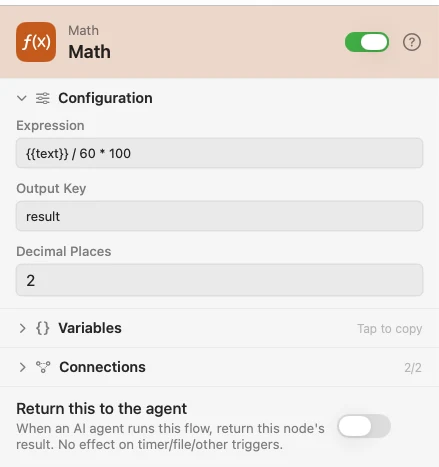
Write the expression with {{key}} wherever a payload value belongs. The result is emitted as a real number, so a downstream Condition or Time Series can use it directly.
Configure
| Field | Default | What it does |
|---|---|---|
| Expression | — | Numbers, {{variables}}, the operators + - * / %, parentheses, and unary +/-. Standard precedence. |
| Output Key | result | Where the number lands. |
| Decimal Places | -1 | -1 keeps full precision; 0 rounds to a whole number, 2 to cents. |
Output
| Key | Type | Value |
|---|---|---|
result | Number | The computed value. Renamed by Output Key |
Example: work out a percentage
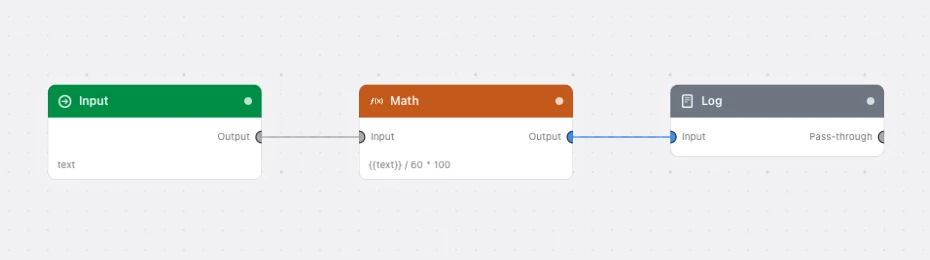
Input supplies a count. Math computes {{text}} / 60 * 100 to two decimals. Log prints it.
Paste this into the Flow Builder to get the same flow:
Take a number from an Input trigger, work out what percentage of 60 it is to two decimal places, and log the answer.
Good to know
Arithmetic only. No functions, no comparisons, no text. An expression that isn't valid arithmetic fails the node with a message naming what it tried to evaluate — usually a {{variable}} that resolved to prose or to nothing, leaving a dangling operator.
% is a remainder, not a percent sign. {{n}} % 3 is "the remainder of n divided by 3".