Every node here takes an Input and passes the payload on through Output with its own keys merged in, so file steps chain: unzip an archive, rename each file, move it somewhere, log what happened. Four of them change or destroy what is already on disk — Move File, Rename File, Move to Trash and Delete File — and all four act on one file until you turn on Allow Folders.
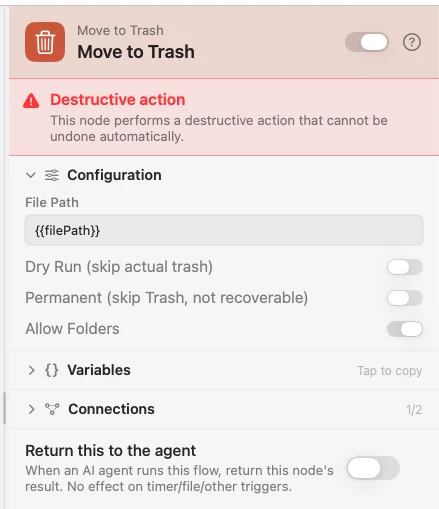
Paths are checked before anything is touched: ~/Library, ~/.ssh, ~/.config, ~/.aws, /etc, /var, /usr, /System and the app's own bundle are refused, .. traversal is rejected, and your home folder and its top-level folders are never accepted as a source. iCloud Drive and the other cloud mounts are carved out and work normally.
Every Files node
Delete FileRemove a file for good. There is no Trash and no undo — prefer Move to Trash unless you mean exactly this.Log to FileAppend one line per run to a file on disk — JSON Lines, CSV, or a line you write yourself.Move FileMove or copy a file to a new place, building the folders on the way if they are not there.Move to TrashSend a file to the macOS Trash, where you can still get it back — or, if you say so, skip the Trash entirely.Open FileOpen a file in whatever app macOS would open it with if you double-clicked it.Rename FileChange a file's name where it stands — from a template, or through a stack of transforms applied in order.UnzipExtract an archive to real files, then send them downstream — once for the whole archive, or once per file.Write FileWrite text to a file — replacing what was there, or adding to the end of it.ZipCompress a file or a folder into one .zip, and hand the archive's path straight to whatever comes next.