At a glance
- Two outlets
- Done fires once with the rollup; Each Device fans out per device
- Emits
- targetDeviceConnected and eight more on Done, five per device
Set it up
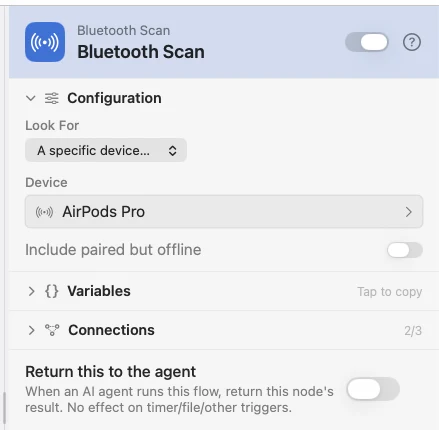
Leave Look For on Anything nearby to list what is around, or choose a specific device and wire {{targetDeviceConnected}} into a Compare as "is true".
A scan is not a radio sweep for strangers — it is one read of macOS's own connection and pairing table, the same source the System Event Bluetooth trigger watches. That is why it is instant, and why there is no signal strength: presence means connected, not close.
Configure
| Field | Default | What it does |
|---|---|---|
| Look For | Anything nearby | A specific device… reveals the picker and fills the targetDevice* keys. |
| Device | — | A live chooser listing everything your Mac is paired with, including devices that are off. Matched by name first, then by remembered address, so the match survives both a rename and address randomisation. |
| Include paired but offline | Off | On also counts devices that are paired but not connected. |
Output
On the Done outlet:
| Key | Type | Value |
|---|---|---|
targetDeviceConnected | Boolean | The headline check — your device is connected right now |
targetDevicePresent | Boolean | It is in the scan at all |
targetDeviceName | String | The matched device's name, or empty |
deviceCount | Number | How many devices the scan found |
deviceNames | String | Comma-joined names, connected first then alphabetical |
found | Boolean | The scan found at least one device |
status | String | ok, empty or permission_denied |
summary | String | A one-line plain-English summary |
devices | Array | Per-device details: name, address, kind, transport, connected |
On each Each Device pass: deviceName, deviceAddress, deviceKind, connected, and index — its zero-based place in the scan.
Example: know when the headphones drop
A Schedule scans, a Condition tests {{targetDeviceConnected}}, and the No branch says so.
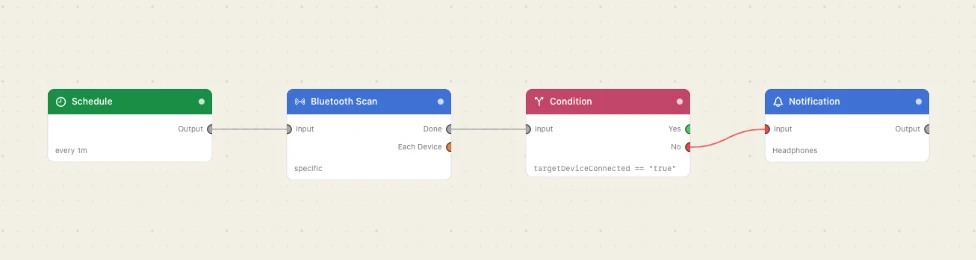
Paste this into the Flow Builder to get the same flow:
Every minute, check whether my AirPods are connected, and notify me when they are not.
Good to know
Denied Bluetooth access does not fail the node. It emits status: "permission_denied" with found: false. A Mac with Bluetooth off, or nothing paired, reads as status: "empty".
Done is the rollup, Each Device is the loop. Wire the yes-or-no check behind Done and the per-device work behind Each Device.