At a glance
- Does
- Writes to the system pasteboard
- Emits
- copied, contentType
Set it up
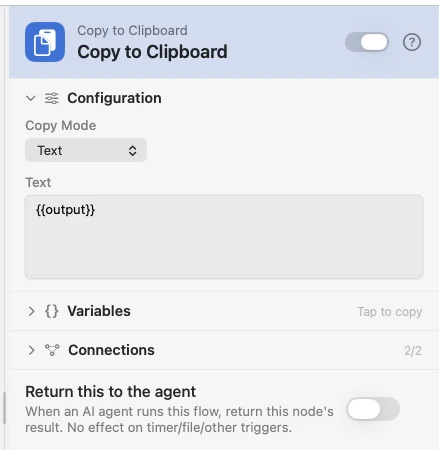
Leave the mode on Auto-detect and the node reads the payload for you, or pick Text or File and say exactly what to copy.
Configure
| Field | Default | What it does |
|---|---|---|
| Copy Mode | Auto-detect | Auto-detect, Text or File. |
| Text | — | The text to copy. Supports {{var}}. Shown in Text mode. |
| File Path | {{filePath}} | The file to copy as a file reference; an image is copied as an image. Shown in File mode. |
Auto-detect takes a filePath key that exists on disk, else the payload's text key, else a short summary of the payload.
Output
| Key | Type | Value |
|---|---|---|
copied | Boolean | Whether the write succeeded |
contentType | String | image, file or text |
Example: copy what a script printed
A hotkey runs a script, its stdout goes on the clipboard, and a notification confirms it.
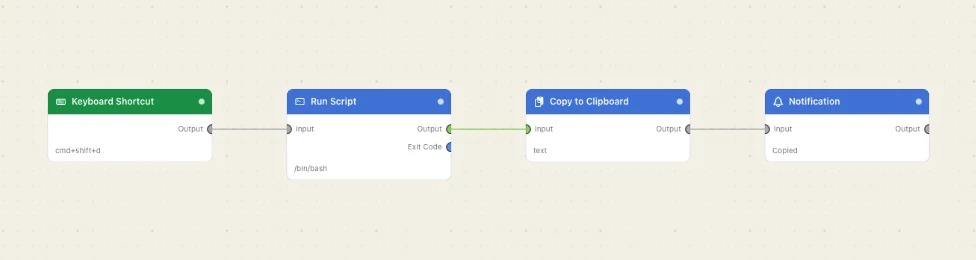
Paste this into the Flow Builder to get the same flow:
On a keyboard shortcut, run a script that prints today's date and copy the result to my clipboard.
Good to know
A copy this node makes is not a copy you made. It is marked, so a Clipboard Changed trigger does not fire on it and a clipboard manager does not re-save what it just restored.