At a glance
- Emits
- userInput
- Want several fields?
- Use Form instead
Set it up
Write the question, choose what kind of answer you want, and decide how long the answer is remembered.
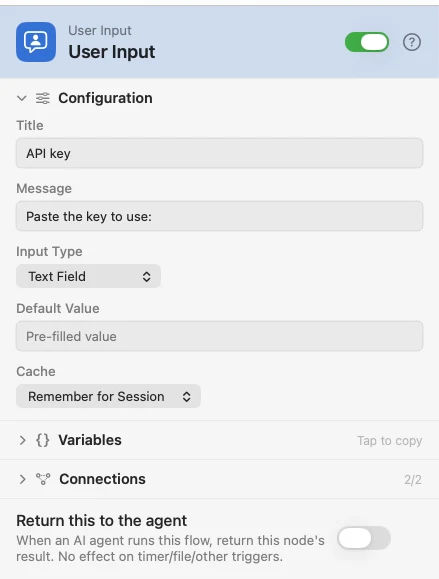
Configure
| Field | Default | What it does |
|---|---|---|
| Title | — | The dialog's title. |
| Message | — | The question above the field. |
| Input Type | Text Field | Text Field, Directory Picker, File Picker or Choice Buttons. |
| Default Value | — | Pre-fills the text field. |
| Choices | — | One button label per line. Shown for Choice Buttons. |
| Cache | Remember for Session | Session answers once until the flow is disarmed; Always Ask asks every time; Remember Forever survives relaunches. |
Output
| Key | Type | Value |
|---|---|---|
userInput | String | What you typed, picked, or the label of the button you pressed |
Example: ask before a scheduled request
A Schedule fires, the flow asks for the key it needs, and the API Request uses it — once per session, not once per fire.
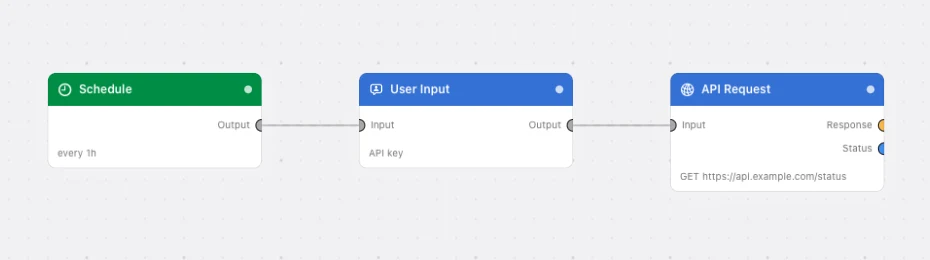
Paste this into the Flow Builder to get the same flow:
Every hour, ask me for an API key, remember it for the session, and GET https://api.example.com/status with it.
Good to know
Cancelling cancels the run — a cancellation, not a failure, so a wired Failure outlet never sees it. The same node firing again within five seconds on the same payload reuses the last answer rather than stacking a second dialog.
Asking several things at once? Form has typed fields, validation and images; this is the single-question version.