At a glance
- Does
- Creates one event in a calendar you pick
- Emits
- calendarEvent.* plus created
- Needs
- Full Calendars access, asked for on first run
Set it up
Give it a Title and a Start. End is optional — leave it blank and the event runs an hour. Pick a calendar, or leave that blank for your default one, and add a location, notes, or all-day if you want them.
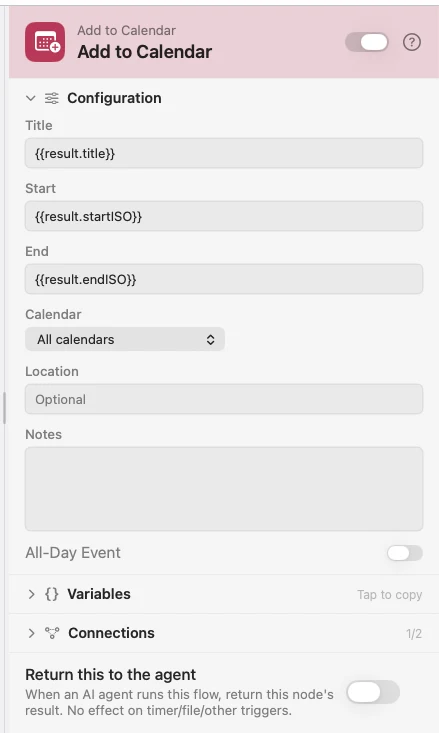
Every field takes {{variable}}, which is what makes the AI pattern work: hand a message to an AI Prompt, have it return a title plus ISO 8601 start and end, and wire those straight in. "Lunch with Sam next Tuesday at noon" becomes a real event.
The event comes back under calendarEvent.* — the same shape the Calendar Event (Apple) trigger and List Calendar Events emit, so downstream nodes read all three the same way.
Configure
| Field | Default | What it does |
|---|---|---|
| Title | — | The event's title. |
| Start | — | ISO 8601, or a date string macOS can read. |
| End | start + 1 hour | Optional. |
| Calendar | Default calendar | Which calendar to add to. |
| Location | — | Optional. |
| Notes | — | Optional details. |
| All-Day Event | Off | Makes it an all-day entry. |
Output
Every key is available downstream as {{key}}.
| Key | Type | Value |
|---|---|---|
calendarEvent.title | String | Event title |
calendarEvent.startISO | String | ISO 8601 start |
calendarEvent.endISO | String | ISO 8601 end |
calendarEvent.location | String | Location, empty if none |
calendarEvent.calendarName | String | The calendar it landed in |
calendarEvent.eventID | String | EventKit identifier of the new event |
calendarEvent.isAllDay | Boolean | Whether it is all-day |
calendarEvent.notes | String | Notes, empty if none |
created | Boolean | True once the event is in |
Example: talk a meeting into the calendar
An Input trigger takes a sentence. An AI node returns a title and ISO 8601 times against a schema. Add to Calendar creates the event.
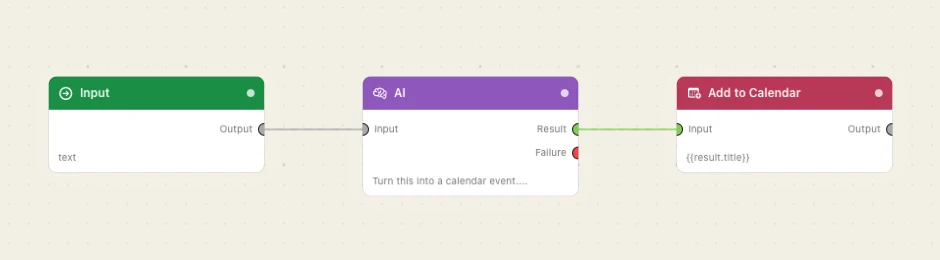
Paste this into the Flow Builder to get the same flow:
Let me type a sentence like "lunch with Sam next Tuesday at noon", have AI turn it into a title and ISO 8601 start and end, and add it to my calendar.
Good to know
Full Calendars access is required. macOS asks the first time the node runs. If you said no, switch Watchflows on under System Settings → Privacy & Security → Calendars — the node cannot prompt twice.
Give the model a schema. An AI node with an Output Schema requiring title, startISO and endISO is the difference between a reliable date and a sentence that reads like one.