At a glance
- Does
- Adds or overwrites one key, with a type you choose
- Emits
- The key you named, plus everything upstream
Set it up
Name the variable, pick its type, write the value. Everything downstream reads it as {{yourName}}.
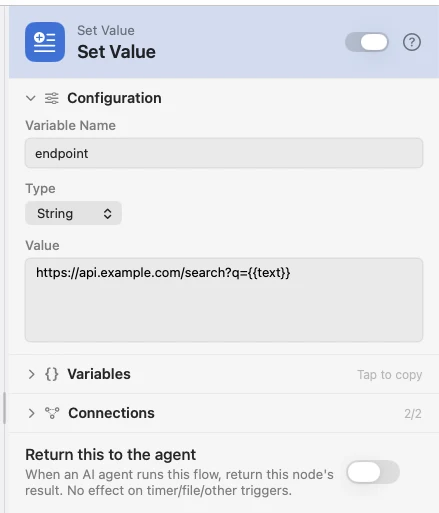
Configure
| Field | Default | What it does |
|---|---|---|
| Variable Name | — | The key to write. An existing key of that name is overwritten. |
| Type | String | String, Number, Boolean or JSON — what the value becomes in the payload, not just how it prints. |
| Value | — | The value to assign. Supports {{var}}. Shown for every type but Boolean. |
| Value (toggle) | Off | Boolean swaps the text area for a switch. |
Output
No fixed keys: the node writes the one you named and passes everything upstream through underneath it.
Example: build a URL before calling it
Set Value assembles the endpoint from the trigger's text, and API Request calls it.
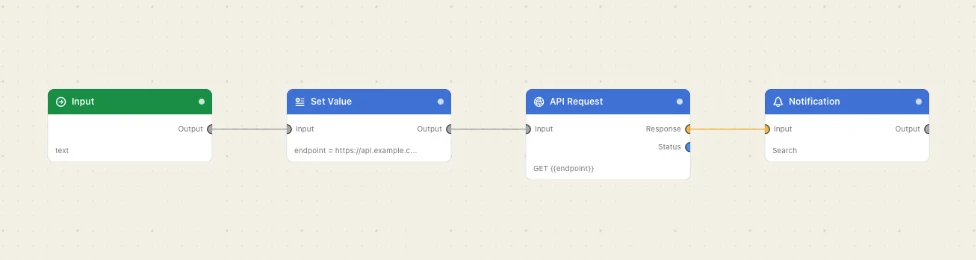
Paste this into the Flow Builder to get the same flow:
Set endpoint to https://api.example.com/search?q={{text}}, GET it, and notify me with the status code.
Good to know
Type matters downstream. A Number compares numerically in a Compare; the same digits as a String compare as text. JSON gives you a real object, so {{config.retries}} resolves.