At a glance
- Takes
- A PDF path on the payload
- Emits
- text, pages, pageCount, metadata on Document; text, index, wasOCR per page
- Good for
- Reading invoices, reports and scans into a flow
Set it up
Point PDF Path at the upstream file. One extraction feeds both outlets, so which one you wire is only a question of the answer you want: Document emits once with the whole file, Page fans out and runs everything downstream once per page, sequentially, with no For Each needed. Text extraction and OCR both run on this Mac.
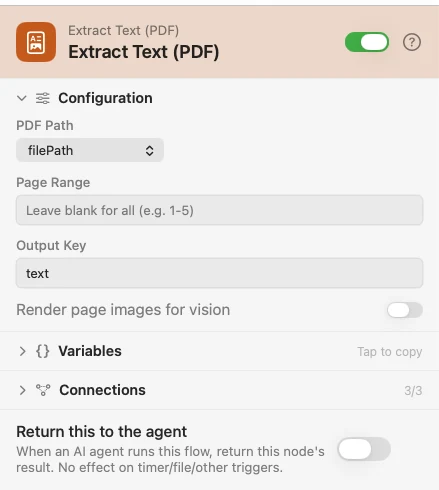
Configure
| Field | Default | What it does |
|---|---|---|
| PDF Path | {{filePath}} | The PDF to read. |
| Page Range | blank (all) | 1-5, 2, or 1-3,7. Pages are 1-based here. A range outside the document is an error, not a silent full read. |
| Output Key | text | Where the extracted text lands. |
| Render page images for vision | Off | Draws each page to a PNG so a vision model can see the layout, not just the stripped text. |
Output
Every key is available downstream as {{key}}.
| Key | Outlet | Value |
|---|---|---|
text | Both | Document: the whole file's text, pages joined. Page: that page's text. Renamed by Output Key |
pages | Document | A real array of {index, text, wasOCR} for every extracted page |
pageCount | Both | Pages in the document — the whole document, even when a Page Range narrowed the read |
metadata | Document | The document's own attributes: Title, Author, and so on |
success | Both | false on a missing, corrupt or non-PDF file, paired with an error |
index | Page | This page's 0-based index |
wasOCR | Page | true when this page's text came from OCR rather than the PDF's text layer |
pageImages | Document | An ordered array of rendered page-image file references — only when the vision toggle is on |
image | Page | This page's rendered image reference — only when the vision toggle is on |
Example: read a PDF two ways
Input picks the file. The Document outlet hands the whole text to a Log node, once. The Page outlet runs a Template once per page, building Page {{index}}: {{text}} — both fed by the same single extraction.
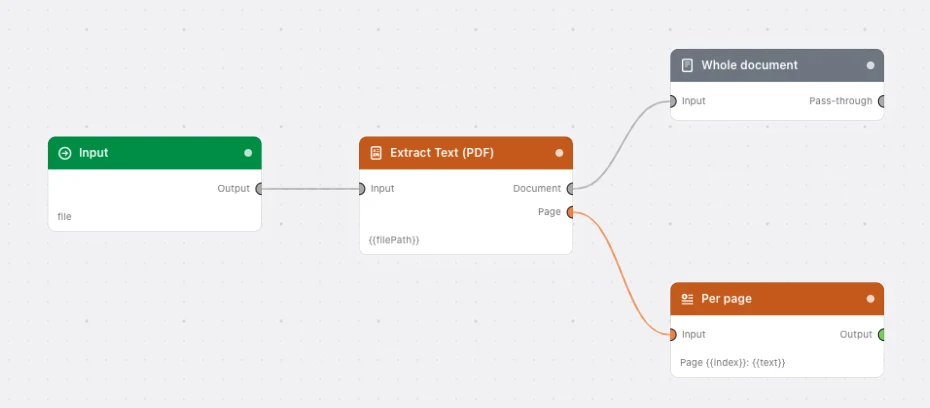
Paste this into the Flow Builder to get the same flow:
Let me pick a PDF with an Input trigger, log its whole text from the Document outlet, and build a per-page line from the Page outlet.
Good to know
A vision model cannot read a PDF — it reads an image. That is what the render toggle is for: each page is rasterised to a PNG, written to a scratch file, and only a lightweight reference travels in the payload, so the bytes never enter your execution history. Bind {{pageImages}} into an AI Prompt node's Image field for one request, or wire the Page outlet and use {{image}} for one call per page.
Leave the toggle off for born-digital PDFs. They already have clean text, and rendering every page is real work. Reach for page images when the visual carries the meaning: scans, forms, signatures, stamps, tables. A single AI request is capped at 20 images, so on a long PDF either route the Page outlet or set a Page Range.
A scanned page costs OCR; a born-digital one costs nothing. The text layer is read first, and the renderer is only touched for a page that comes back empty. wasOCR tells you which happened.
pageCount is the document's, not the range's. Count {{pages}} if you want how many were actually extracted.
A failure is a payload, not a stopped run. A missing or corrupt file comes back as success: false, pages: [], pageCount: 0 and an error — on both outlets.