At a glance
- Three outlets
- Flow anchors the preview, Done carries the result, Pass-through carries your input
- Emits
- ranFlows, plus each child's payload
Set it up
Pick the flows in the inspector's picker — up to three, in order. Only flows that have a trigger can be chosen, and each pick draws a live preview on the canvas.
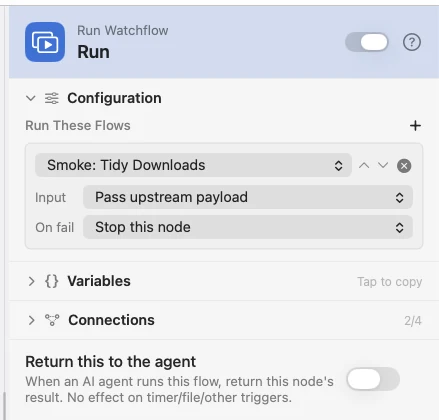
Flow anchors the dimmed preview and carries no data. Done fires when the children finish. Pass-through forwards your original input unchanged, so the main line keeps building. Each picked flow has its own Input mode (pass this payload down, or start empty) and its own On fail behaviour, so one child can be load-bearing while another is allowed to fail.
The preview is the real flow
The flow you pick renders as a dimmed shadow branching off the node — a live window onto the real thing, not a copy. Hover lights it up; clicking a shadow node edits the source flow everywhere it is used; the arrow jumps to its own builder; the cards light up as the subflow runs. Mark a flow Locked in its builder's sidebar and its shadow becomes view-only. A Run Watchflow node inside a preview is not expanded — it draws as a named collapsed card you click to open.
The trigger is just the door
A called flow's trigger does not wait for its event: the upstream payload is injected at its outlet and the flow runs immediately, so the trigger's own configuration is ignored. A child enters through the first enabled trigger by canvas position — top-most, left-most where two sit level — and every other trigger is dormant for the call. When there is more than one, the preview is drawn inside a tinted section labelled with the flow and its door, with a single dashed stub in place of the ones that will not fire.
Output
| Key | Type | Value |
|---|---|---|
ranFlows | Array | Every child that ran — name, status and namespace, in order |
| the child's payload | Any | One flow: its final payload directly, so you read {{movedCount}}. Several: each under a namespace derived from its name, so {{tidy_downloads.result}} and {{tidy_downloads.status}} |
A second call to the same flow gets a _2 suffix, and namespaces are assigned before launch, so they never depend on which child finished first.
Example: call a reusable tidy-up
A daily Schedule calls a Tidy Downloads flow and then says what it moved. One flow, so Done hands its payload over directly — the Notification reads {{movedCount}}, with no wrapper.
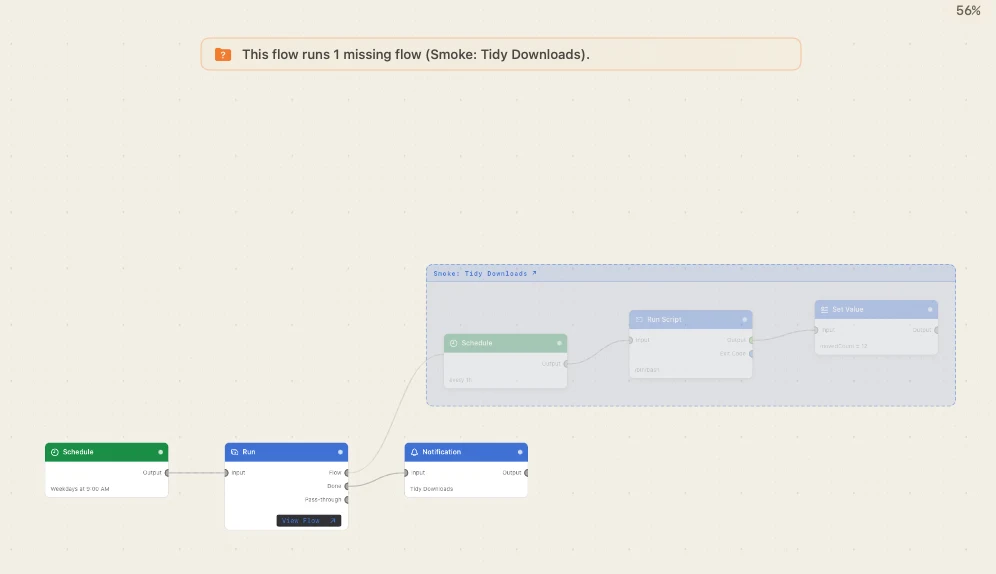
Paste this into the Flow Builder to get the same flow:
Every day at 9am run my Tidy Downloads flow and notify me how many files it moved.
Good to know
The 64-run budget is shared, not per node. One budget is made at the root run and threaded through every descendant, so it counts every child invocation across the whole fan-out and recursion tree together. A wide flow exhausts it as easily as a deep one, and the node asking for the 65th is refused.
Nesting stops at four. The root is depth 1, so a child at depth 4 is the deepest allowed. Recursion is refused outright — a flow cannot appear twice on the same call stack.
A child needs what its trigger would have given it. If the flow expects a field its trigger normally supplies, the node names the missing one — fill it with a Set Value before the call. A child answer over 64KB is spilled to a file reference before it is merged, so a big result never sits inline in the parent.