At a glance
- Does
- Trashes one file; Permanent removes it outright
- Emits
- originalPath, trashedPath, success, permanent
- Works with
- Any file outside the protected locations
Set it up
Leave File Path blank and the node takes filePath off the incoming payload — the usual wiring behind a file trigger. Fill it in to template a path of your own.
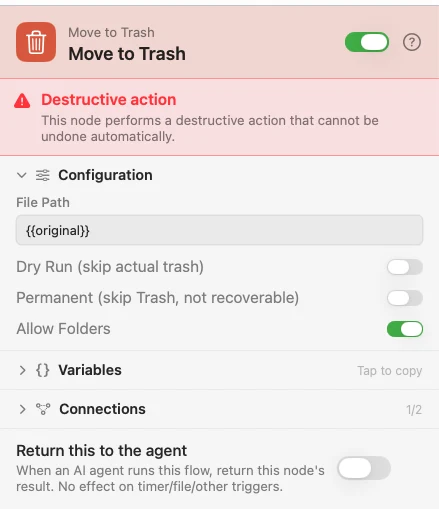
Dry Run resolves the path, runs every safety check and returns the same payload without touching anything — leave it on while you wire the flow up. Permanent bypasses the Trash and removes the file with no way back; the default routes through the Trash, which is the whole reason to reach for this node over Delete File.
Configure
| Field | Default | What it does |
|---|---|---|
| File Path | — | The file to trash. Blank falls back to filePath on the payload. |
| Dry Run (skip actual trash) | Off | Resolve and validate, then return without trashing. |
| Permanent (skip Trash, not recoverable) | Off | Remove the file directly instead of trashing it. |
| Allow Folders | Off | Let the source be a folder instead of a single file. |
Output
Every key is available downstream as {{key}}.
| Key | Type | Value |
|---|---|---|
originalPath | String | Where the file was |
trashedPath | String | Where it landed in the Trash — empty when Permanent or Dry Run |
success | Boolean | Whether the operation succeeded |
permanent | Boolean | Whether the Trash was bypassed |
dryRun | Boolean | Present and true only when Dry Run skipped the removal |
Example: archive a folder, then bin the original
Input takes a folder and Set Value remembers its path — Zip overwrites filePath with the archive. Move to Trash, with Allow Folders on, then sends the original to the Trash, where it is still there if the archive turns out wrong.
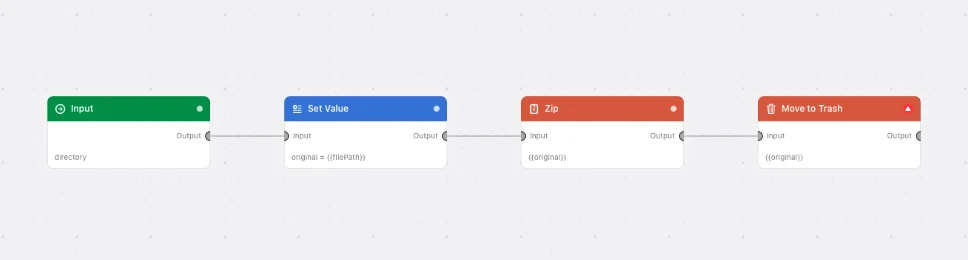
Paste this into the Flow Builder to get the same flow:
Zip the folder I pick, then move the original folder to the Trash.
Good to know
Allow Folders widens the blast radius. These nodes act on one file: a folder as the path is refused until you turn Allow Folders on, and then the whole tree goes with it. Your home folder and its top-level folders — Desktop, Downloads, Documents, Pictures, Movies, Music — are never a source, toggle or not; a file inside one is ordinary. A package like .app counts as a file either way.
Permanent is not undoable. The file is removed, not trashed, and nothing in Watchflows or the Finder brings it back. Any flow containing this node asks for confirmation every time it is armed, whichever mode it is in.
Dry Run is how you check the path. It returns the same originalPath a real run would, folder refusal included, so you can see what the flow resolved before letting it act.