At a glance
- Takes
- Any payload, or an upstream logFile path
- Good for
- Reading what Log to File just wrote, without leaving the canvas
Set it up
Wire it after a Log to File action and leave File Path empty — it reads the logFile key that node puts on the payload. Or type a path of your own; ~ is expanded.
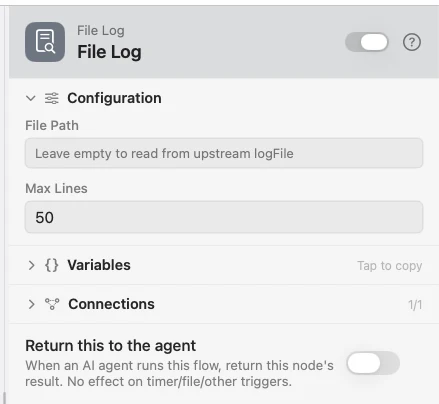
Configure
| Field | Default | What it does |
|---|---|---|
| File Path | — | The file to read. Leave empty to use the upstream logFile. |
| Max Lines | 50 | How many lines from the end of the file to show. |
Example: read back what was written
Input hands the flow a line. Log to File appends it. File Log shows the tail.
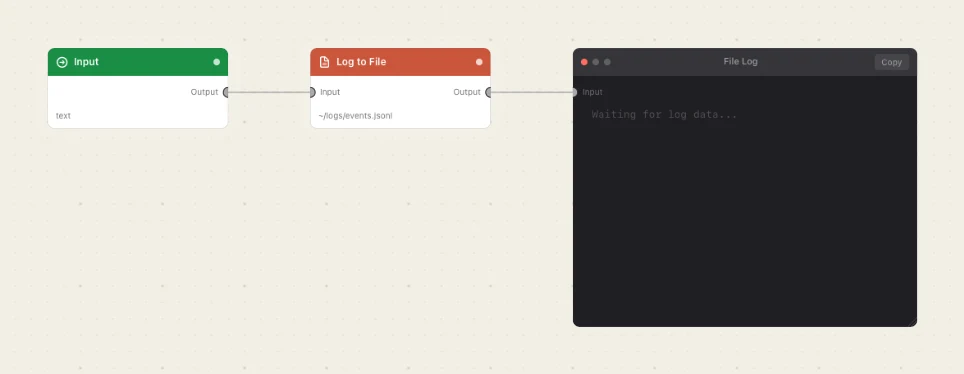
Paste this into the Flow Builder to get the same flow:
Take text from an Input trigger, append it to a log file in my home folder, and show that file in a File Log viewer.
Good to know
This node has no outlet. It is the end of its branch — put it after everything else, or on a spur of its own.
A missing file empties the viewer rather than failing. The node reports no error; it just shows nothing, which is also what an empty file looks like.