At a glance
- Takes
- Any payload
- Emits
- The payload unchanged, on the outlet whose case matched
- Good for
- Fanning out a command, a status, a category or a file type to its own branch
Set it up
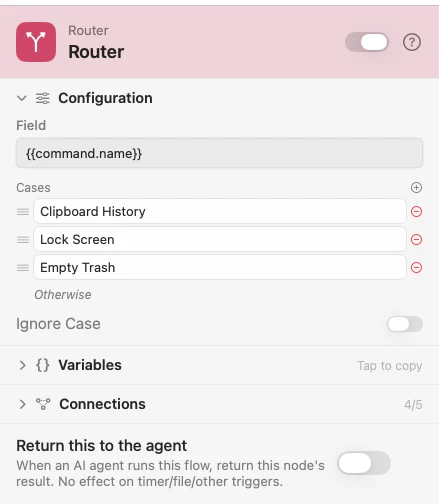
Pick the Field to route on, then add one row under Cases for each value you expect. Each case becomes an outlet on the card, in the order you list them, and Otherwise is always last: a value no case names leaves there. Where a Condition asks one yes-or-no question, a Router answers "which one?" in a single card.
Configure
| Field | Default | What it does |
|---|---|---|
| Field | — | The payload key to read. Write it bare, command.name, or as a template, {{command.name}}; a template can also mix text and keys. |
| Cases | — | One value per row. A row matches when it equals the field's value, with spaces around either ignored. Blank rows are skipped and make no outlet. |
| Ignore Case | Off | Match lock screen to the case Lock Screen. |
Output
The payload passes through unchanged on exactly one outlet: the first case, top to bottom, whose value equals the field's. A field that is missing or blank leaves on Otherwise.
Each case outlet's id is outlet_case_ plus the case lowercased, with every run of characters other than letters and digits turned into one _ and none left at either end. Lock Screen is outlet_case_lock_screen, .pdf is outlet_case_pdf. Otherwise is outlet_otherwise. You only need the ids when you write a flow by hand.
Example: branch on which command was picked
A Pick from List with three wire-out commands — Lock Screen, Empty Trash, Clipboard History — leaves on its Command outlet. A Router reads {{command.name}} with one case per command, and each outlet goes to the work that command does. Otherwise stays unwired: every command has its own case.
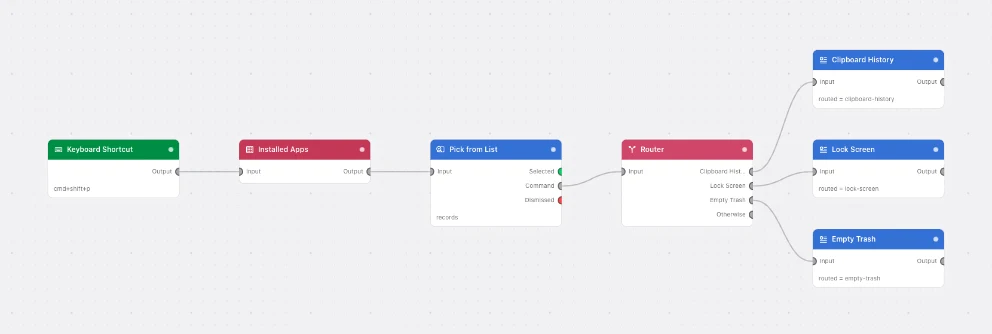
Paste this into the Flow Builder to get the same flow:
On a keyboard shortcut, show my installed apps with three commands on top — Lock Screen, Empty Trash and Clipboard History — open the app I pick, and give each command its own branch.
Example: sort new files by extension
A Directory Changed trigger watches Downloads. A Router reads fileExtension — lowercased, no dot — with the cases pdf, png and zip. Each case moves the file to its own folder; Otherwise leaves everything else where it landed.
Paste this into the Flow Builder to get the same flow:
When a file lands in Downloads, move PDFs to Documents, PNGs to Pictures and ZIPs to Archives, and leave anything else alone.
Good to know
Rename a case and its wire follows. Removing a case removes its wire with it, so nothing is left pointing at an outlet that no longer exists.
Two cases that differ only in capitals or punctuation share one outlet. Lock Screen and lock-screen both make outlet_case_lock_screen; the inspector flags the second, and a value that matches it leaves on the first one's outlet.
Matching is on the whole text. pdf does not match pdfx, and 1.0 does not match 1. Use a Condition when you need contains, a regular expression or a number comparison.