At a glance
- Does
- Pastes a template's text into the front app and restores the clipboard
- Emits
- pasted, text, error
- Needs
- Accessibility permission to press the keys
Set it up
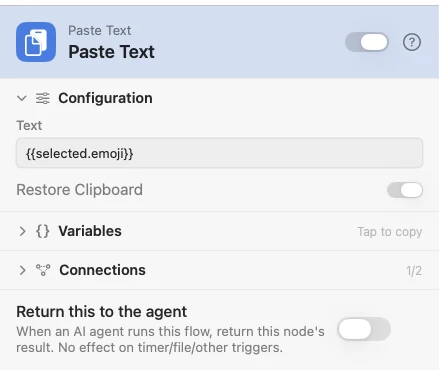
Wire it behind the Selected outlet of a Pick from List and set Text to the column you want, {{selected.emoji}} for example. It lets go of the chooser first, so the paste lands in your app and not in the chooser.
Configure
| Field | Default | What it does |
|---|---|---|
| Text | {{text}} | What to paste. A template, so it can mix words and {{variables}}. |
| Restore Clipboard | On | Brings the old clipboard back about 300ms after the paste, every kind of content it held. If you copied something new in that moment, yours stays. |
Output
Every key is available downstream as {{key}}, merged over what came in.
| Key | Type | Value |
|---|---|---|
pasted | Boolean | Whether the text was pasted |
text | String | The text it pasted |
error | String | Why nothing was pasted. Only present when pasted is false. |
error is one of:
nothing_to_paste: the text came out empty or only whitespace. The clipboard is not touched.permission_denied: accessibility: the text is left on the clipboard so you can paste it by hand.
Example: paste what you picked
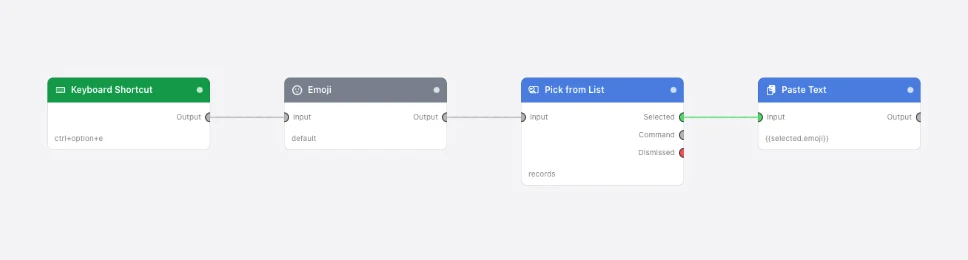
When I press Control-Option-E, list every emoji, let me pick one from a Pick from
List grid, and paste the emoji I picked into the app in front.
Good to know
- A flow you open from outside this Mac that holds a Paste Text node asks before it opens, as for Simulate Key Press.
- Restore waits for the paste, so the next node starts about 300ms later.