At a glance
- Takes
- Any payload
- Emits
- One key per row you define, plus the rest of the payload unless you drop it
- Good for
- Lifting a nested value to the top level so downstream fields read cleanly
Set it up
Each row is new key → {{value}}, read left to right: "call this latitude, and fill it from {{response.latitude}}". A row whose value is a lone {{path}} keeps the real type — an array stays an array, a number stays a number — which is what makes this the node for flattening an API response before a For Each or a Condition reads it.
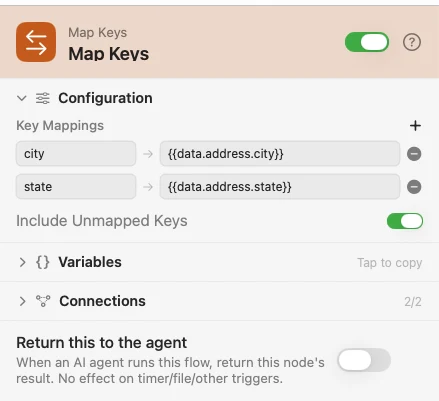
Configure
| Field | Default | What it does |
|---|---|---|
| Key Mappings | — | Rows of new key → value template. The picker offers the upstream variables. |
| Include Unmapped Keys | On | Off emits only the keys you defined, dropping everything else. |
Output
The output carries one key per row, plus the rest of the incoming payload when Include Unmapped Keys is on.
| Value you write | What lands |
|---|---|
{{response.latitude}} | The value itself, type intact — .json, .array and numbers survive |
{{payload}} | The entire input as one object |
{{first}} {{last}} | Text, because a mixed template renders |
Room {{n}} | Text, for the same reason |
Example: lift a nested value
Input supplies JSON. Map Keys pulls city → {{data.address.city}} up to the top level. Log shows the flattened payload.
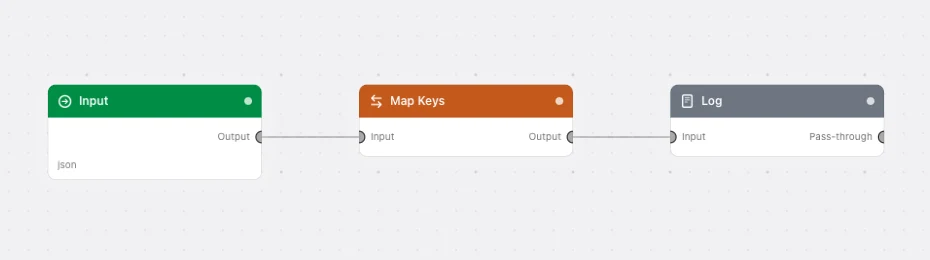
Paste this into the Flow Builder to get the same flow:
Take JSON from an Input trigger, map its nested address city up to a top-level city key, and log the payload.
Good to know
A missing single-token source writes no key at all. With Include Unmapped Keys on, a value already sitting under that name survives rather than being clobbered with null.
A mixed template always renders to text. If you need an array to stay an array, the whole value must be one {{path}} and nothing else.