At a glance
- Fires when
- A USB device or display connects or disconnects
- Emits
- Event, device name, vendor and product id, display count, timestamp
- Events
- USB Connected/Disconnected · Display Connected/Disconnected
Set it up
Pick the event. The two USB events each get their own optional name filter.
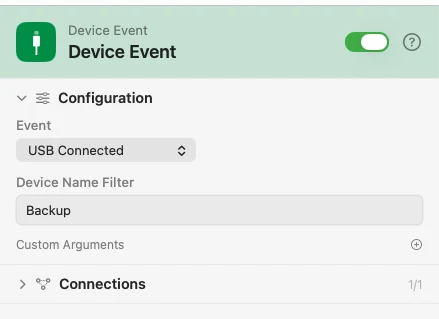
Configure
| Field | Default | What it does |
|---|---|---|
| Event | USB Connected | USB Connected, USB Disconnected, Display Connected, or Display Disconnected. |
| Device Name Filter | — | USB events. Fire only when the device name contains this text. Connect and disconnect keep separate filters. |
| Custom Arguments | — | Extra key-value pairs merged into the payload. |
Output
Every key is available downstream as {{key}}.
| Key | Type | Value |
|---|---|---|
event | String | The event that fired |
deviceName | String | Name of the device (USB events) |
vendorID | String | USB vendor id |
productID | String | USB product id |
displayCount | Number | How many displays are now active (display events) |
timestamp | String | When it happened, ISO 8601 |
Example: plug in the drive, back up
Device Event waits for a USB device whose name contains "Backup". Template names it, Notification announces the backup.
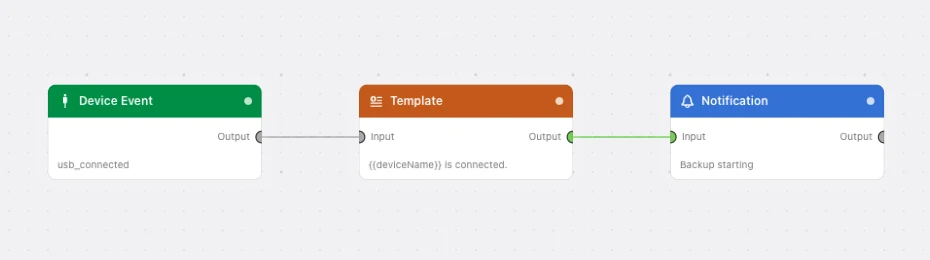
Paste this into the Flow Builder to get the same flow:
When a USB device with "Backup" in its name is plugged in, notify me that the backup is starting.
Good to know
Bluetooth and audio are not here. Headphones, keyboards, and mice arriving over Bluetooth fire on System Event, which carries the pairing and transport detail. Nothing fires when the default audio output changes.