At a glance
- Emits
- pressed, shortcut
- Needs
- Accessibility permission for Watchflows
Set it up
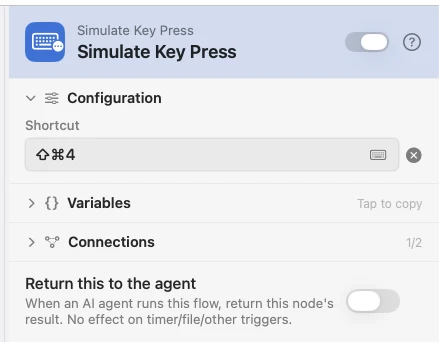
Click the recorder and press the combination you want played back. Trust Watchflows first in System Settings, Privacy & Security, Accessibility.
Configure
| Field | Default | What it does |
|---|---|---|
| Shortcut | — | Click to record. Typed spellings work too: cmd+shift+k. |
Output
| Key | Type | Value |
|---|---|---|
pressed | Boolean | Whether the keystroke was sent |
shortcut | String | The combination, written the way a menu shows it |
Example: fire a shortcut in the app you are in
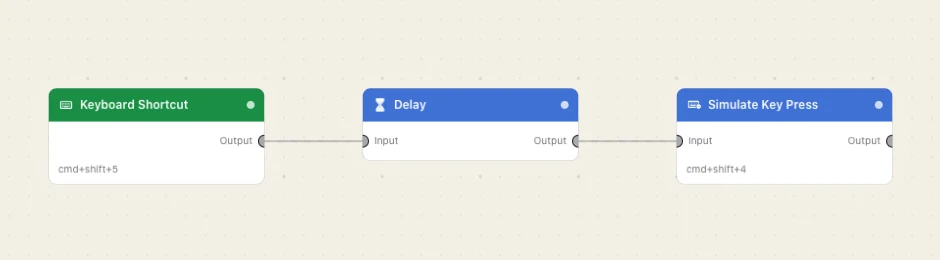
A hotkey fires, a Delay lets the frontmost app settle, and the keystroke goes out.
Paste this into the Flow Builder to get the same flow:
When I press a hotkey, wait half a second and then send Command-Shift-4.
Good to know
The keystroke lands wherever focus is — Watchflows does not choose the app. A recorded cmd+q, cmd+w, cmd+shift+delete or a bare delete marks the node destructive, and the flow asks you to confirm every arm.
Permission denied is not a crash. pressed is false and an error of permission_denied: accessibility comes out.