Linear: Query Issues

Action action.linear_query

Read issues out of Linear — your assigned work, the current cycle, a project, or a filtered search — as a real array a flow can loop over or hand to an AI node.

Where Linear: Create Issue and Linear: Add Comment write to Linear, this node reads from it. Point it at one of four kinds of query, narrow it with a few shared filters, and it fetches the matching issues in a single page and emits them as a structured payload. The signature use is a morning briefing: on a schedule, pull the issues that matter and let an AI node turn them into a paragraph you actually read.

This node requires a connected Linear account. Open Settings → Integrations and paste a Linear Personal API key before using it. See the Integrations guide for the full connection walkthrough. Because it only reads, it is safe to run on a timer without side effects.

Ports

DirectionNameData TypeDescription
InputInputAnyIncoming payload — passed through and available for {{var}} interpolation in the scope fields
OutputOutputAnyThe incoming payload merged with issues, count, and hasMore

Query Modes

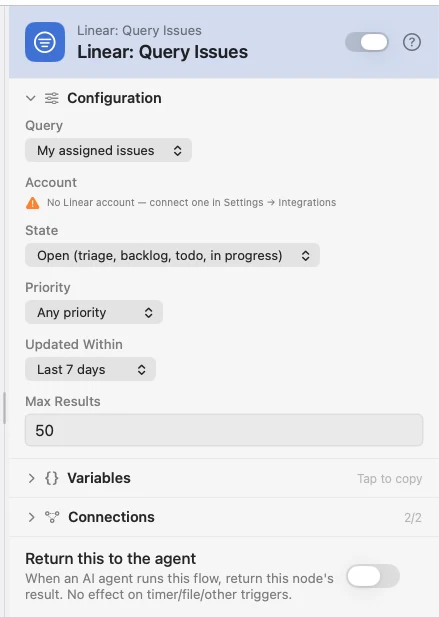
The Query dropdown picks what to fetch. Every mode also honors the shared State / Priority / Updated Within filters below.

ModeValueReturnsScope needed
My assigned issuesmy-assigned-issuesIssues assigned to the connected account's own user.Account only
Current cyclecurrent-cycleIssues in the team's active cycle. A team with no running cycle simply returns an empty array.Account → Team
Project issuesproject-issuesIssues belonging to a specific project.Account → Team → Project
Search (filters only)searchThe whole workspace, narrowed by only the shared filters — no assignee, cycle, or project pin.Account only

Configuration

FieldTypeDefaultDescription
modeDropdownmy-assigned-issuesWhich of the four queries to run (see the table above).
scopeAccount › Team › Project PickerThe cascading picker. Choose the connected Linear Account, then narrow to a Team (for Current cycle) and a Project (for Project issues). The team and project rows appear only for the modes that need them.
stateDropdownallWorkflow-state bucket. Open = triage, backlog, todo, in progress; Active = todo + in progress; All states applies no state filter.
priorityDropdownanyPriority floor. High or Urgent, Urgent only, or Any priority (no filter).
updatedAfterDropdownAny timeRecency window on updatedAt: last 24 hours, 7 days, or 30 days.
limitNumber50Max issues to fetch in this one page. Clamped to Linear's 1…250 window. If the workspace holds more matches than the page returns, hasMore is true.

The team and project fields accept {{var}} interpolation, so an upstream node can route the scope dynamically — the picker just writes the resolved ids for you. This node fetches a single page; there is no cursor or auto-pagination in this release.

Output Payload

The results are merged into the incoming payload under three keys. Crucially, issues is a real array of structured objects — not JSON packed into a string — so a downstream Loop, an {{issues.0.…}} template, or an AI node can iterate it directly.

VariableTypeDescription
issuesArrayThe matching issues. Each element is a nested object (shape below). Nothing matched → an empty array ([]), never a missing key.
countNumberHow many issues came back on this page (the length of issues).
hasMoreBooleantrue when the workspace holds more matches than this single page returned — raise limit or narrow the filters.

Feeding a Loop? Set its arrayKey to issues.

The For Each node iterates whatever key you point its Loop Over field at — here that is issues. Each element is exposed as {{item}} (or your chosen item name), so you reach the nested fields with {{item.identifier}}, {{item.state.name}}, and so on.

Per-issue shape

Every element of issues carries this lean, nested shape. (There is no issue description — a briefing wants the shape, not the body.) Reach a field on the first result with {{issues.0.…}}, or on the current loop element with {{item.…}}.

FieldTypeDescription
identifierStringHuman-readable id, e.g. WAT-123
titleStringIssue title
urlStringWeb URL of the issue
priorityNumberNumeric priority: 0 none, 1 urgent, 2 high, 3 medium, 4 low
priorityLabelStringThe priority as a word, e.g. Urgent
state.nameStringWorkflow-state name, e.g. In Progress
state.typeStringState category: triage, backlog, unstarted, started, completed, canceled
assignee.nameStringAssignee username (null if unassigned)
assignee.displayNameStringAssignee display name
assignee.emailStringAssignee email
project.idStringParent project UUID (null if none)
project.nameStringParent project name
cycle.idStringCycle UUID (null if not in a cycle)
cycle.numberNumberCycle number
cycle.nameStringCycle name
cycle.endsAtStringCycle end timestamp (ISO 8601)
team.keyStringTeam key, e.g. WAT
team.nameStringTeam name
dueDateStringDue date (null if unset)
createdAtStringCreation timestamp (ISO 8601)
updatedAtStringLast-updated timestamp (ISO 8601)

Recommended pattern: the daily briefing

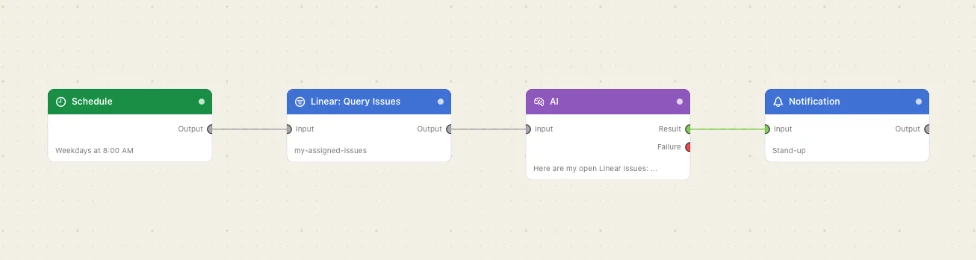
The cleanest use is one holistic AI call. A Schedule trigger fires the flow each morning, the Query node pulls your issues, and a single AI Prompt receives the whole {{issues}} array and writes a short summary — which a Notification delivers. One request, one paragraph, the full picture.

A prompt like “Here are my open Linear issues: {{issues}}. Write a two-sentence stand-up summary grouped by state.” works because {{issues}} hands the model the real array. Because the results emit under issues and not linear, you can even chain a Create Issue before the query without either clobbering the other's keys.

Alternative: act on each issue

When you need a per-issue action rather than one summary — post a comment, write a row to a log, ping a webhook — feed the array into a For Each loop. Set its Loop Over field to issues; each pass exposes one issue as {{item}}, so downstream nodes read {{item.identifier}}, {{item.state.name}}, {{item.assignee.displayName}}, and the rest.

Prefer the single AI call for anything you'd read — it costs one request and reasons over the whole set. Reach for the loop only when each issue needs its own side effect.

AI Agent tool

The same query is available to the Agent node as the read-only tool linear_query_issues, with full parity to this node's four modes and filters. It is opt-in — enable it in the Agent's Tools section (it appears once a Linear account is connected) — so an autonomous agent can pull issues mid-reasoning. Being read-only, it is not a destructive tool and needs no confirmation.