At a glance
- Does
- Creates or adds to a .zip archive
- Emits
- archivePath, filePath, fileName, itemCount, byteCount, success
- Works with
- Files, folders, and a fan-out that accumulates into one archive
Set it up
Source is the file or folder to compress — pick the upstream variable that holds the path, usually filePath; blank falls back to filePath on the payload. Archive Path is where the .zip goes, and it takes {{variable}} like any other path field.
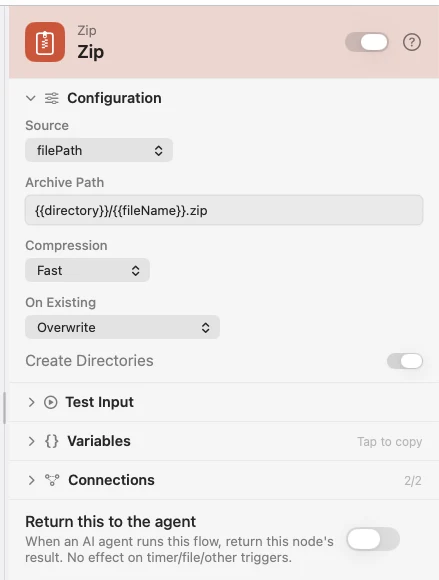
Both archivePath and filePath come out pointing at the new archive, so it drops into a Move, Delete or upload step with nothing to remap.
One archive from many files
Set On Existing to Append and each run adds to the same archive rather than replacing it. That is what collapses a fan-out into one zip: wire Unzip's File outlet, or any per-file loop, into a Zip with Append, and the files accumulate. Iterations run one at a time, so the appends cannot race.
Two things to watch. Use a fixed Archive Path — the per-file default {{fileName}}.zip gives each file its own archive. And Append accumulates across runs too, so delete or move the archive first when you want to start fresh.
Configure
| Field | Default | What it does |
|---|---|---|
| Source | {{filePath}} | The file or folder to compress. |
| Archive Path | {{directory}}/{{fileName}}.zip | Where to write the archive. |
| Compression | Fast | Advisory. ditto exposes no level flag, so every option produces the same archive today. |
| On Existing | Overwrite | Overwrite replaces it, Append adds to it, Keep both writes a numbered path. |
| Create Directories | On | Make any missing folders in the archive path. |
Output
Every key is available downstream as {{key}}.
| Key | Type | Value |
|---|---|---|
archivePath | File | Absolute path to the archive |
filePath | File | The same path, so the next node needs no remapping |
fileName | String | Name of the archive |
itemCount | Number | How many files went in |
byteCount | Number | Size of the archive on disk, in bytes |
success | Boolean | false on a graceful failure — see below |
Example: archive a project and file it away
Input takes a folder. Zip compresses it next to itself. Move File puts the archive in an Archives folder.
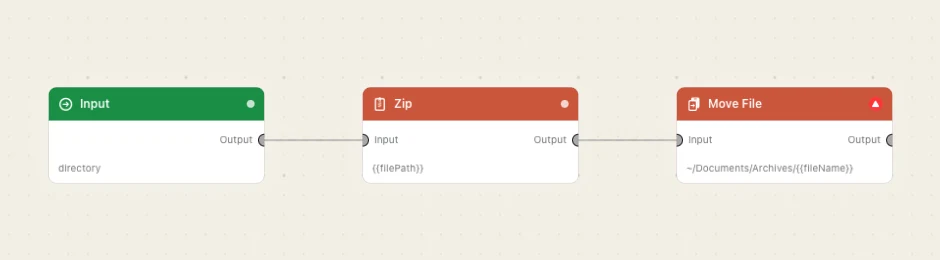
Paste this into the Flow Builder to get the same flow:
Zip the folder I pick and move the archive into ~/Documents/Archives.
Good to know
Everyday problems come back as success: false, not a failed run. A missing source path gives error no_input_path and a path with nothing at it gives source_not_found. The run continues so a Condition can route the failure.
Only a real safety violation stops the run. A source or destination inside a protected location, a .. escape, or a ditto that exits non-zero — a full disk, say — throws and marks the node failed. iCloud Drive and the other cloud folders are allowed.