At a glance
- Emits
- awake, scope, timeoutMinutes
- Released by
- An Allow Sleep node, the timeout, the menu-bar toggle, or deleting the node
- Does not stop
- Closing the lid, choosing Sleep, or a critically low battery
Set it up
Drop it in front of the long part of the flow and put Allow Sleep after the work.
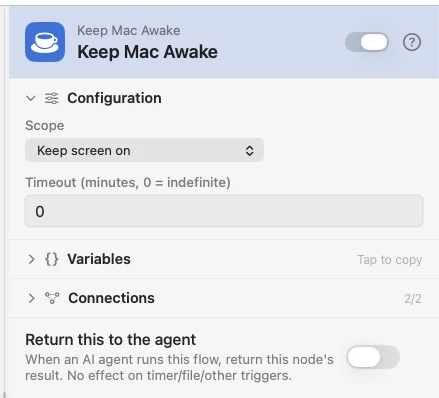
Configure
| Field | Default | What it does |
|---|---|---|
| Scope | Keep screen on | Keep screen on blocks display and system sleep. System awake, let display sleep keeps the Mac running with the screen off. |
| Timeout (minutes, 0 = indefinite) | 0 | Minutes before the hold releases itself. 0 holds until something releases it. |
Output
| Key | Type | Value |
|---|---|---|
awake | Boolean | Whether a hold is active — false if the assertion could not be taken |
scope | String | screenOn or systemOnly |
timeoutMinutes | Number | Minutes until it auto-releases; 0 is indefinite |
Example: stay up for an export
Keep Mac Awake takes the hold, a script runs the export, Allow Sleep hands it back.
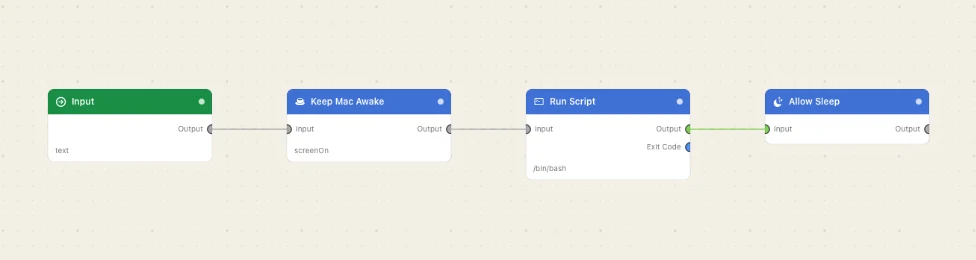
Paste this into the Flow Builder to get the same flow:
Keep my Mac awake with the screen on, run an export script, then let it sleep again.
Good to know
You cannot get stuck awake. The assertion belongs to the Watchflows process, so quitting or crashing frees the Mac. The menu bar's Keep Awake toggle lights up while anything is holding, and switching it off releases every hold at once.
It stops idle sleep, not every sleep. Closing the lid, choosing Sleep, and a critically low battery still put the Mac down. Re-running the node replaces its own hold, so there is only ever one per node.