At a glance
- Fires when
- You press the recorded key combination
- Emits
- The shortcut, a readable version, the key code, timestamp
- Needs
- Accessibility permission
Set it up
Click the recorder, press the combination you want, and decide whether the keypress stops there.
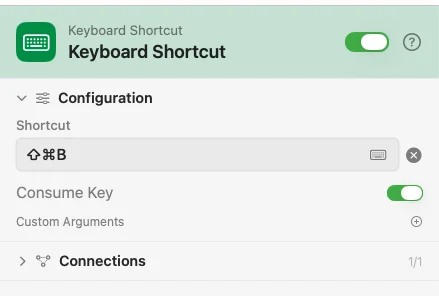
Configure
| Field | Default | What it does |
|---|---|---|
| Shortcut | — | The combination to listen for. Click to record it. |
| Consume Key | On | Swallow the keypress so no other app sees it. Off passes it through as well. |
| Custom Arguments | — | Extra key-value pairs merged into the payload. |
Output
Every key is available downstream as {{key}}.
| Key | Type | Value |
|---|---|---|
shortcut | String | The combination as configured: cmd+shift+b |
shortcutDisplay | String | The readable form: ⌘⇧B |
keyCode | Number | The virtual key code |
timestamp | String | When it was pressed, ISO 8601 |
Example: one key, one build
⌘⇧B starts the flow. Template writes the line, Notification confirms.
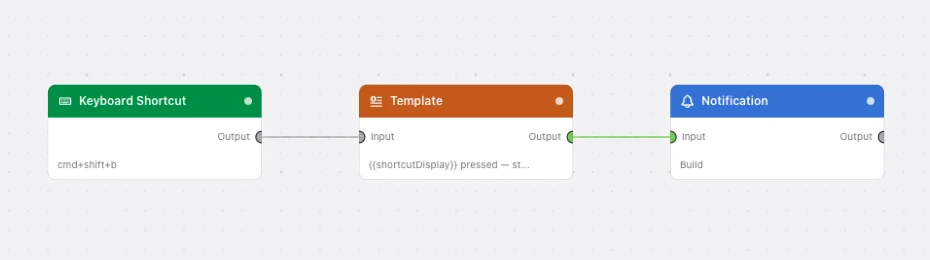
Paste this into the Flow Builder to get the same flow:
When I press Cmd+Shift+B, notify me that the build has started.
Good to know
Needs Accessibility permission. Watchflows listens with a system event tap, so macOS asks the first time. Without it nothing fires. Grant it in System Settings ▸ Privacy & Security ▸ Accessibility, then restart the app.
Consume Key on means the app in front never sees the press. Pick a combination nothing else claims.