A trigger has no inlet. It watches one thing — a file, the clock, the clipboard, an HTTP request, a key combination — and when that thing happens it emits a payload the rest of the flow reads as {{key}}.
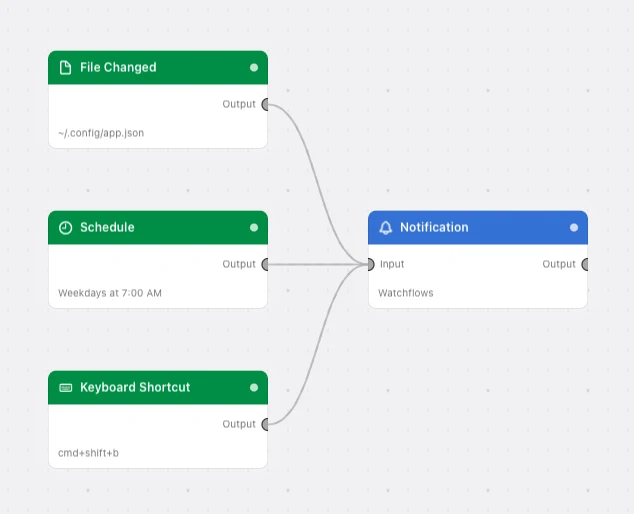
Most triggers arm themselves the moment the flow is enabled and keep watching in the background, whether or not Watchflows is in front. Input and Form are the exceptions — they wait for you to press Run. One flow can hold several triggers, and fan-in is fine: they can all feed the same node.
Every Triggers node
App EventRuns your flow when an app you pick launches, quits, or comes to the front.Calendar Event (Apple)Runs your flow when an event in your macOS Calendar is created, edited, or deleted.Clipboard ChangedRuns your flow every time you copy something — and keeps copied images as files, so a path is there when a downstream node needs one.Device EventRuns your flow when a USB device or a display is plugged in or pulled out.Directory ChangedRuns your flow when a file lands in a folder you watch — or changes there, or goes away.File ChangedRuns your flow the moment one specific file is created, changed, or deleted.FormAsks you for a handful of typed values before the flow starts — a floating panel with real fields, validation, and a Submit button.InputStarts a flow by hand and feeds it a value — a fixed one you set up front, or one you are asked for each time you run.Keyboard ShortcutRuns your flow on a global hotkey, from anywhere on the Mac, whatever app is in front.Photo AddedRuns your flow when a new photo reaches your Photos library — an iPhone sync, an import, a save from Messages or Mail.Public WebhookGives one flow a public HTTPS address, so GitHub, Stripe, or any internet sender can start it — no port forwarding, no tunnel, no server of your own.ScheduleRuns your flow on the clock — every few minutes, or at one time of day on the days you choose.System EventRuns your flow when the Mac itself does something — sleeps, wakes, locks, changes network, mounts a volume, or meets a Bluetooth device.WebhookRuns your flow when an HTTP request arrives on this Mac — from a script, a local tool, or another machine on your network.