At a glance
- Does
- One model turn — classify, extract, summarise, translate, describe an image
- Emits
- result, model, tokens, provider, imageProvided
- Needs
- A provider configured in Settings → AI Providers
Set it up
The node is called AI in the palette. Drop it in, write the prompt, pick a provider and a model. {{variable}} pulls in anything upstream, so a Template step in front is usually unnecessary. The answer lands on result.
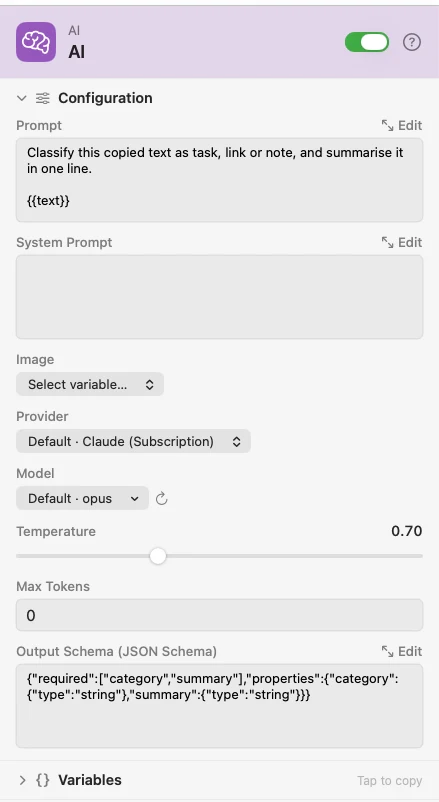
Leave Model blank to use the provider's default — a request carrying an image then routes to the Default Image Model, text-only to the Default Model. An explicit choice is never re-routed.
Two outlets: Result carries the answer, Failure carries error and errorType. Leave Failure unwired and a provider outage fails the run; wire it and you get a recovery path.
For anything longer than a sentence, open Prompt in the Workbench — a full-window editor with live variable preview, test values, and a run for just this node.
Send an image
Pick a variable in Image and a vision-capable model looks at it: {{filePath}} from a Photo Added trigger, or an ordered array like {{pageImages}} from Extract Text (PDF), up to 20 images in one request. Leave Image blank and nothing is attached unless the payload already carries an images list — which is what the Chat node does with images you paste. Nothing else is ever sent on its own.
HEIC is transcoded to JPEG; JPEG, PNG, WebP and GIF go as-is; anything over roughly 10 MB is refused. Ollama and LM Studio report per-model capability, so a text-only model returns a clear error instead of silently dropping the image.
Shape the answer
Put a JSON Schema in Output Schema and result comes back as parsed JSON with the required keys present. Where the provider enforces schemas natively — OpenAI, OpenRouter, Google, Ollama, Anthropic, Apple Intelligence — the model is constrained as it writes. Everywhere else Watchflows instructs, validates, and retries on a mismatch.
Configure
| Field | Default | What it does |
|---|---|---|
| Prompt | — | What you are asking for. Supports {{variable}}. |
| System Prompt | — | Role and behaviour for the model, set once. Optional. |
| Image | None | Which payload value holds the image. Blank sends nothing unless the payload carries an images list. |
| Provider | — | One of the providers configured in Settings, or Watchflows AI. |
| Model | — | Blank uses the provider's default and routes by content. |
| Temperature | 0.7 | Slider, 0 to 2. Lower is more deterministic. |
| Max Tokens | 0 | Cap on the response. 0 uses the default cap of 8,192 tokens. |
| Output Schema (JSON Schema) | — | Validates the response as JSON and retries on failure. |
Output
Every key is available downstream as {{key}}.
| Key | Type | Value |
|---|---|---|
result | String | The response text — parsed JSON when Output Schema is set |
model | String | The model that generated it |
tokens | Number | Total tokens used |
provider | String | The provider that answered |
imageProvided | Boolean | True when an image was actually sent |
error | String | Failure outlet only: the human-readable message |
errorType | String | Failure outlet only: the category — apiError, noProvider, schemaValidationFailed, modelLacksVision, noDefaultImageModel, imageTooLarge or contextWindowExceeded here; other nodes report their own (invalidConfiguration, scriptFailed, …), and error covers a failure that names no category |
Example: triage what lands on the clipboard
Clipboard Changed fires on a copy. The AI node classifies it against a schema that requires category and summary. Notification shows both.
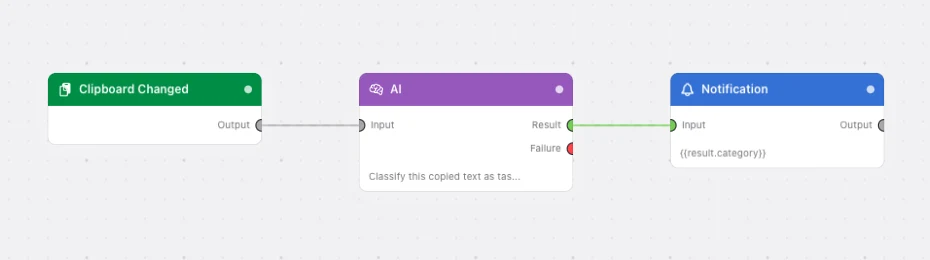
Paste this into the Flow Builder to get the same flow:
When I copy text, have AI classify it as a task, a link or a note with a one-line summary, and notify me with both.
Good to know
Privacy follows the provider. A local model keeps the prompt and the image on this Mac. A cloud provider receives both. The inspector says which applies to the provider you picked.
Structured output is what Apple Intelligence is best at. Its guided generation constrains the decoder to your schema as it samples, so the shape is valid by construction, on-device, at no cost. It is text-only with a small context window — keep those prompts compact.
A Failure wire is cheaper than a failed run. Branch on {{errorType}} to fall back to a second provider, log the outage, or notify yourself, instead of the whole flow stopping.