At a glance
- Fires when
- A calendar event changes inside the look-ahead window
- Emits
- The event under calendarEvent.*, plus a timestamp
- Needs
- Full Calendars access
Set it up
It reads your calendars natively — there is no account to connect and no API key. macOS asks for Calendars access the first time the flow arms.
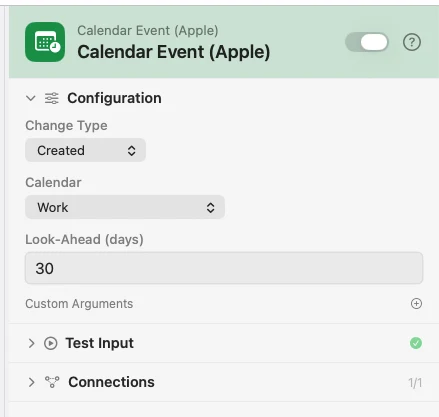
Configure
| Field | Default | What it does |
|---|---|---|
| Change Type | Created | Created, Edited, Deleted, or All Changes. |
| Calendar | — | Limit to one calendar. Leave it unset to watch them all. |
| Look-Ahead (days) | 30 | How far forward to watch for changes. |
| Custom Arguments | — | Extra key-value pairs merged into the payload. |
Output
The event arrives nested, so reach into it as {{calendarEvent.title}}.
| Key | Type | Value |
|---|---|---|
calendarEvent.title | String | Event title |
calendarEvent.startISO | String | Start, ISO 8601 |
calendarEvent.endISO | String | End, ISO 8601 |
calendarEvent.location | String | Location, empty if there is none |
calendarEvent.calendarName | String | Which calendar it belongs to |
calendarEvent.eventID | String | Calendar's own identifier — series-level for a recurring event |
calendarEvent.isAllDay | Boolean | Whether it is all-day |
calendarEvent.notes | String | Notes, empty if there are none |
calendarEvent.changeKind | String | created, edited, or deleted |
timestamp | String | When the change was noticed, ISO 8601 |
Example: a note for every new meeting
Calendar Event fires on Created. Template builds a heading from {{calendarEvent.title}} and {{calendarEvent.startISO}}. Notification shows it.
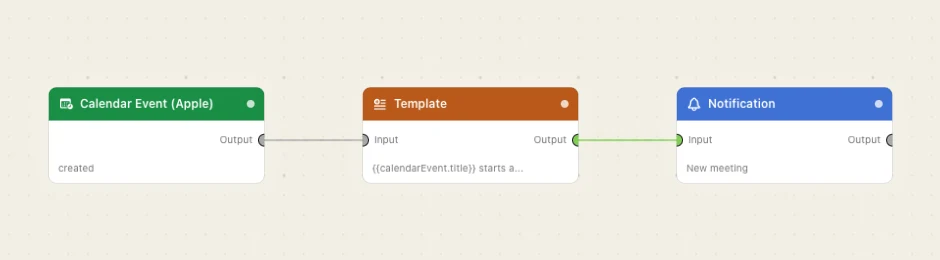
Paste this into the Flow Builder to get the same flow:
When a new event is added to my Work calendar, notify me with its title and start time.
Good to know
Events that already exist do not fire. Arming the trigger is not a change; only what happens afterwards counts.
Each occurrence of a recurring event is tracked on its own, so moving one Tuesday reports that Tuesday. calendarEvent.eventID is the series' identifier, shared across occurrences.
Sliding out of the window is not a deletion. An event that simply falls past the look-ahead is never reported as deleted.