At a glance
- Does
- Search & Play, Play, Pause, Next Track, Previous Track
- Emits
- trackName, artistName, albumName, playing
- Needs
- Permission to control Music, granted on first run
Set it up
Pick an Action. Search & Play looks your query up and starts it; the other four are direct commands. Search Type says what you are looking for — a song, album, playlist or artist — and Shuffle and Start At apply to whatever ends up playing.
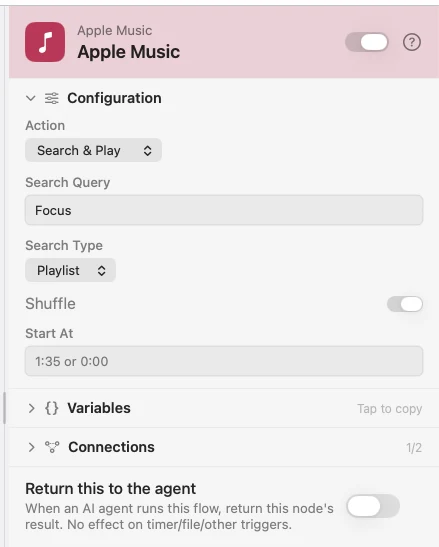
Search Query takes {{variable}}, so the thing to play can come from a form, a chooser, or a model.
Configure
| Field | Default | What it does |
|---|---|---|
| Action | Search & Play | Search & Play, Play, Pause, Next Track, or Previous Track. |
| Search Query | — | What to look for. Supports {{variable}}. |
| Search Type | Song | Song, Album, Playlist, or Artist. |
| Shuffle | Off | Turns shuffle on before playing. |
| Start At | — | Jump to a position, e.g. 1:35. |
Output
Every key is available downstream as {{key}}.
| Key | Type | Value |
|---|---|---|
trackName | String | Name of the current track |
artistName | String | Artist of the current track |
albumName | String | Album of the current track |
playing | Boolean | Whether music is playing |
Example: a hotkey that starts the focus playlist
Keyboard Shortcut fires on a key combo. Apple Music plays a named playlist, shuffled.
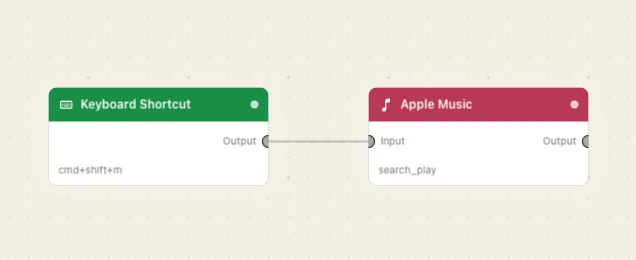
Paste this into the Flow Builder to get the same flow:
When I press a keyboard shortcut, shuffle-play my Focus playlist in Apple Music.
Good to know
Music is driven through AppleScript. The first run raises a macOS prompt asking to control Music; if you dismiss it, turn Watchflows on again under System Settings → Privacy & Security → Automation.
It searches your library, not the catalogue. AppleScript can only reach what you have added — anything with a + Add in the Music app, plus your own playlists. A search for something you have never added fails with "No … found". Adding does not mean downloading; a streamed-but-added album plays fine.