At a glance
- Emits
- artifyde.viewUrl, artifyde.rawUrl, artifyde.pageId, artifyde.versionId, artifyde.versionNumber
- Needs
- An Artifyde account connected in Settings, Integrations
Set it up
Get an API token at artifyde.com under Settings, API tokens — free tier included — and connect it in Settings, Integrations; see Integrations. Then put an HTML Template step above this node and leave Page Content alone.
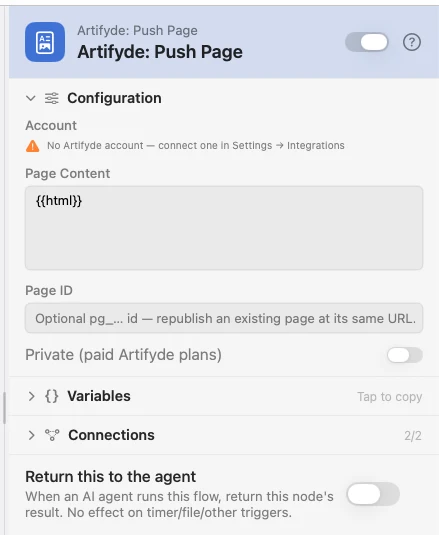
Configure
| Field | Default | What it does |
|---|---|---|
| Account | — | The connected account to publish with. |
| Page Content | {{html}} | The page. The default picks up whatever an upstream HTML Template rendered; paste a whole page here to override it. Must resolve to non-empty HTML. |
| Page ID | — | An existing pg_… id. Set it and the push adds a version to that page, so the URL never changes. Usually {{artifyde.pageId}} from an earlier push. |
| Private (paid Artifyde plans) | Off | On requires a paid plan; a free account gets a clear error. |
There is no title field — Artifyde takes it from your HTML's first h1.
Output
| Key | Type | Value |
|---|---|---|
artifyde.viewUrl | String | Web URL of the published page |
artifyde.rawUrl | String | Raw-HTML URL of this exact version |
artifyde.pageId | String | The stable pg_… id — feed it back into Page ID to republish |
artifyde.versionId | String | The ver_… id this push created |
artifyde.versionNumber | Number | 1 for a new page, incrementing on each republish |
Example: a report you can send someone
An AI node writes the copy, HTML Template renders it, Push Page publishes it, a Notification hands you the link.
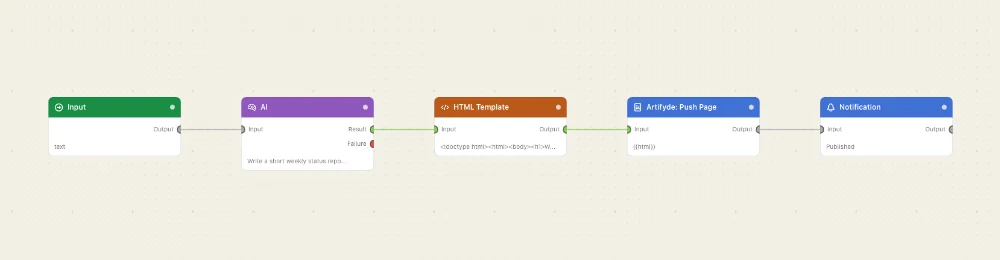
Paste this into the Flow Builder to get the same flow:
Have an AI summarise my open issues, render it as an HTML page, publish it to Artifyde, and notify me with the URL.
Good to know
A pushed page is public unless you make it private. The URL is unguessable, but it is not protected — anyone you send it to can open it, and so can anyone they send it to.
The page must be self-contained. Inline CSS and JS and data: images work; a CDN stylesheet, a web font or a remote image never loads once the page is hosted.
One stable URL for a dashboard. Save {{artifyde.pageId}} with a Database node on the first run and put it back into Page ID afterwards.