At a glance
- Emits
- linearComment.url, linearComment.id
- Needs
- A Linear account connected in Settings, Integrations
Set it up
Connect a Linear workspace in Settings, Integrations — see Integrations. Then say which issue, and what to say on it.
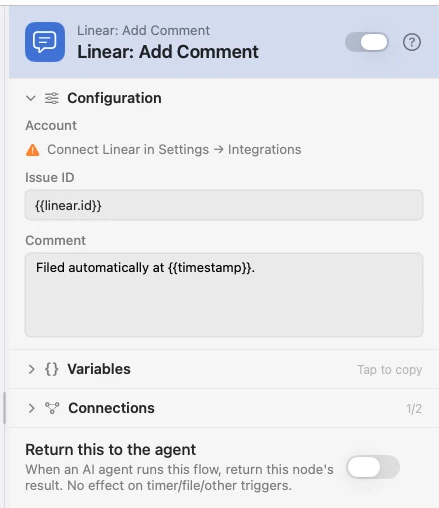
Configure
| Field | Default | What it does |
|---|---|---|
| Account | — | The connected workspace. Hidden when you have only one. |
| Issue ID | — | A UUID or a readable identifier like WAT-123. Usually {{linear.id}} from a Create Issue above it. |
| Comment | — | The body, in Markdown. Supports {{var}}. |
Output
| Key | Type | Value |
|---|---|---|
linearComment.url | String | Web URL of the posted comment |
linearComment.id | String | Linear's internal comment UUID |
Example: file it, then annotate it
Create Issue files the ticket and hands back {{linear.id}}; Add Comment posts the run's details underneath it.
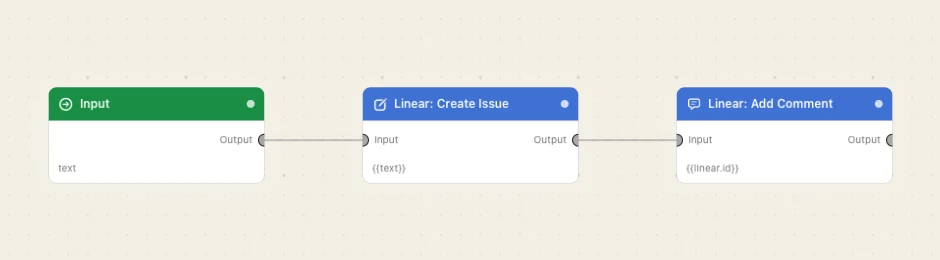
Paste this into the Flow Builder to get the same flow:
File a Linear issue from a prompt, then add a comment to that same issue with the time it was filed.
Good to know
Both spellings work. The readable identifier is easier to hard-code; {{linear.id}} is what an upstream node hands you.