At a glance
- Takes
- Any payload
- Emits
- text (renamable)
- Good for
- Notification bodies, filenames, messages, prompts
Set it up
Write the text and drop {{key}} wherever a payload value belongs. The incoming payload passes through underneath the rendered string.
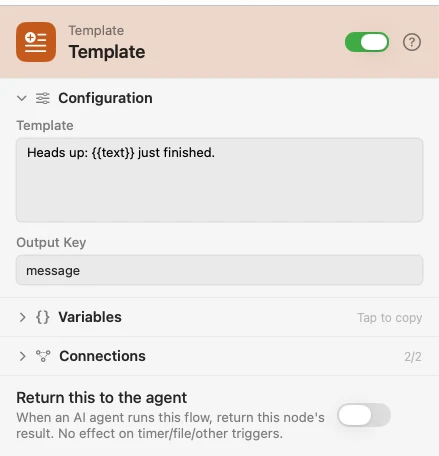
Configure
| Field | Default | What it does |
|---|---|---|
| Template | — | The text. {{key}} and {{key.nested}} both resolve; {{payload}} drops the whole payload in as JSON. |
| Output Key | text | Where the rendered string lands. Rename it when one flow builds more than one string. |
Output
| Key | Type | Value |
|---|---|---|
text | String | The rendered text. Renamed by Output Key |
Example: describe what arrived
Input hands the flow a value. Template builds a sentence. Notification shows it.
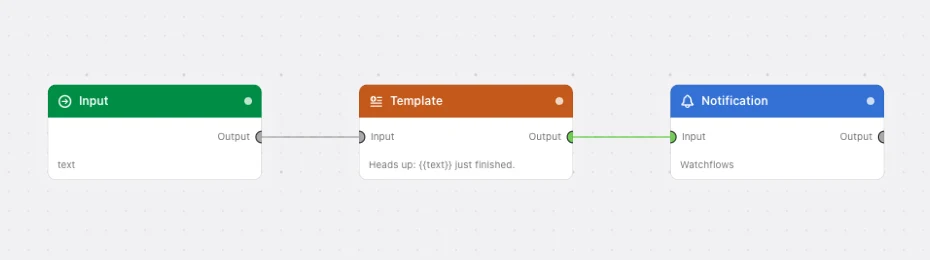
Paste this into the Flow Builder to get the same flow:
Take text from an Input trigger, build a message that repeats it back, and show it in a notification.
Good to know
A key that isn't there renders as nothing. {{missing}} becomes an empty string rather than leaving the braces in the text, so a half-filled template reads as a gap, not as a bug.
A whole object or array used as text renders as JSON. Dropping {{records}} into a sentence gives you the JSON, not a crash.
Substitution runs once over the template. A value that itself contains {{…}} is not re-scanned.