At a glance
- Takes
- An image path on the payload
- Emits
- An exif object, four flat copies, success and hasExif
- Good for
- Renaming photos by capture date, sorting by camera, filtering by location
Set it up
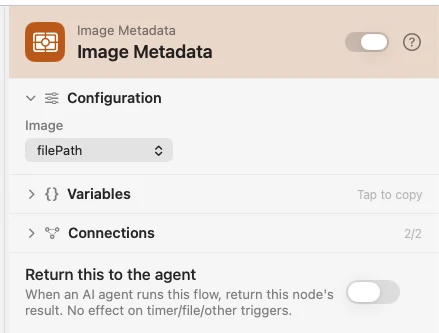
Point Image at the upstream file — {{filePath}} from a Photo Added trigger, say. The EXIF lands in a nested exif object you reach with dot paths, and the photo's own keys stay on the payload so a later node can still act on it.
Configure
| Field | Default | What it does |
|---|---|---|
| Image | {{filePath}} | The image to read. |
Output
Every key is available downstream as {{key}}. Keys the image doesn't carry are left out entirely, and a missing {{exif.*}} renders as an empty string.
| Key | Type | Value |
|---|---|---|
success | Boolean | false when the image was missing, unreadable, or not an image |
hasExif | Boolean | true when a camera wrote real EXIF beyond pixel dimensions — a screenshot is typically false |
error | String | On failure only — what went wrong |
exif.dateTaken | String | Capture date, ISO-8601: 2023-06-15T14:30:22 |
exif.dateTakenCompact | String | Capture date as a filename-safe stamp: 20230615-143022 |
exif.cameraMake | String | Manufacturer — Apple |
exif.cameraModel | String | Model — iPhone 15 Pro |
exif.lensModel | String | Lens, when the camera recorded one |
exif.iso | Number | ISO sensitivity |
exif.aperture | Number | f-number — 2.8 |
exif.focalLength | Number | Millimetres — 24 |
exif.shutterSpeed | String | Photographer-style exposure — 1/250 |
exif.pixelWidth · exif.pixelHeight | Number | Dimensions in pixels |
exif.orientation | Number | EXIF orientation, 1–8 |
exif.gpsLatitude · exif.gpsLongitude | Number | Signed decimal degrees; south and west are negative |
The four most-templated values — dateTaken, dateTakenCompact, cameraModel, lensModel — are also copied to the top level, so {{dateTakenCompact}} works without the dot path.
Example: read a photo's capture date
Input picks a photo. Image Metadata reads its EXIF. Template builds a caption from {{exif.dateTakenCompact}} and {{exif.cameraModel}}, and Log records it.
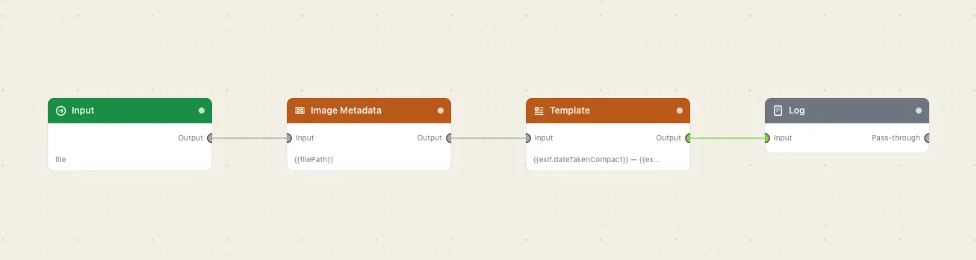
Paste this into the Flow Builder to get the same flow:
Let me pick a photo with an Input trigger, read its EXIF metadata, build a caption from the capture date and camera model, and log it.
Good to know
A failure is a payload, not a stopped run. A missing or non-image file comes back as success: false with an error, so branch on it with a Condition.
Dates are the photo's own wall clock. EXIF stores a zone-less local time, and it is parsed and formatted in UTC so the same string round-trips on every Mac. It is not converted to your time zone.
GPS arrives already signed. EXIF stores unsigned degrees plus an N/S/E/W letter; the letter is folded into the sign here, so {{exif.gpsLatitude}} is ready for a comparison.