At a glance
- Fires when
- The chosen macOS event happens
- Emits
- The event, plus keys specific to it
- Events
- Sleep · Wake · Screen Lock · Screen Unlock · Dark Mode · Network · Volume Mount/Unmount · Bluetooth Connect/Disconnect
Set it up
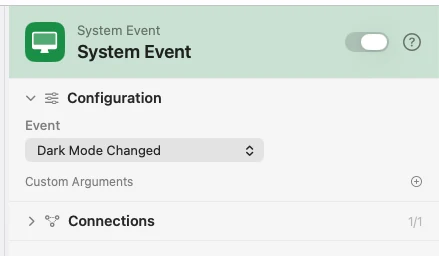
Pick one event. The fields below the dropdown change with it — only the Bluetooth events have any.
Configure
| Field | Default | What it does |
|---|---|---|
| Event | Wake | Sleep, Wake, Screen Lock, Screen Unlock, Dark Mode Changed, Network Changed, Volume Mount, Volume Unmount, Bluetooth Device Connected, or Bluetooth Device Disconnected. |
| Device Name Filter | — | Bluetooth events. Fire only when the device name contains this text, case-insensitively. The connect and disconnect events each keep their own filter. |
| Paired Devices Only | On | Bluetooth events. Only devices paired with this Mac fire — what the Bluetooth menu shows. Each event keeps its own switch. |
| Custom Arguments | — | Extra key-value pairs merged into the payload. |
Output
event and timestamp always arrive. The rest depend on which event fired.
| Key | Type | Value |
|---|---|---|
event | String | The event that fired |
timestamp | String | When it fired, ISO 8601 |
isDarkMode | Boolean | Dark mode's new state (dark mode) |
networkType | String | wifi, cellular, wired, or other (network) |
isConnected | Boolean | Whether the network is up (network) |
isExpensive | Boolean | Whether it is metered (network) |
volumeName | String | Name of the volume (volume events) |
volumePath | String | Where it mounted (volume events) |
deviceName | String | The Bluetooth device's name |
deviceAddress | String | Its MAC address, ac-88-fd-ee-30-66 |
deviceKind | String | headphones, audio, keyboard, mouse, gamepad, phone, computer, or unknown |
transport | String | classic or ble |
isPaired | Boolean | Whether it is paired with this Mac |
deviceClass | Number | Raw Bluetooth class-of-device; 0 for BLE |
vendorID | String | HID vendor id, when available |
productID | String | HID product id, when available |
Example: dark mode, announced
System Event watches Dark Mode Changed. Template reads {{isDarkMode}}. Notification shows which way it went.
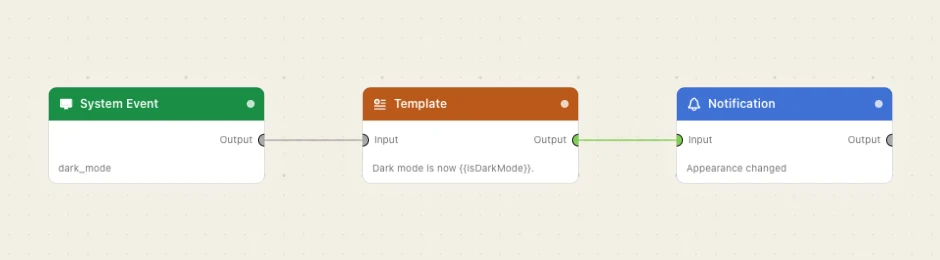
Paste this into the Flow Builder to get the same flow:
When macOS switches dark mode, notify me which mode it is now in.
Good to know
Bluetooth needs its own permission. The first time a Bluetooth flow arms, macOS asks. Denied, the trigger stays unarmed until you allow it in System Settings ▸ Privacy & Security ▸ Bluetooth.
Disconnects wait three seconds. A device that comes back inside that window — AirPods hopping to your phone and back — emits nothing. A real disconnect fires about three seconds after the drop.
Waking counts as connecting. Devices that reconnect on wake, or when the radio comes back on, fire real connect events on purpose: "when my AirPods connect, set the volume" should run then too.
Paired Devices Only exists because of phantom links. Some devices open a second, unpaired low-energy link alongside the real one — AirPods do it in their case — which would otherwise fire a duplicate connect under the same name. Turn it off to see every link, and route on {{isPaired}} or {{transport}}.
Names shift between connect and disconnect. The personalised name ("Greg's AirPods Pro") is available while connected; a disconnect may only know the generic one. Filters match either as a substring, but an exact match should use {{deviceAddress}}.