At a glance
- Fires when
- The macOS clipboard changes
- Emits
- Text, content type, pasteboard types, timestamp, image path
- Keeps
- Image copies as PNGs in the Clips folder
Set it up
Drop the node in and wire its outlet. There is nothing to point it at — it watches the system pasteboard.
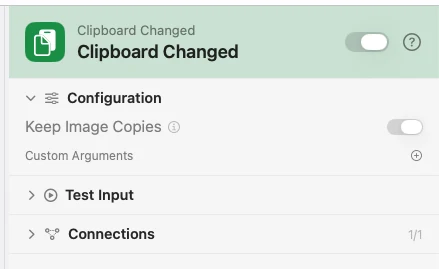
Configure
| Field | Default | What it does |
|---|---|---|
| Keep Image Copies | On | Write each copied image to the Clips folder as a PNG and hand the flow its path. Off still fires on an image copy — there is just no file and no imagePath. |
| Custom Arguments | — | Extra key-value pairs merged into the payload. |
Output
Every key is available downstream as {{key}}.
| Key | Type | Value |
|---|---|---|
text | String | The copied text |
contentType | String | text, image, or other |
types | Array | The pasteboard types on offer |
timestamp | String | When the copy happened, ISO 8601 |
imagePath | String | Path to the saved PNG — only when the content is an image and the file was written |
imageError | String | Why an image could not be saved — only when the write failed, in which case there is no imagePath |
Example: summarise what you copied
Clipboard Changed hands over {{text}}. Template shortens it. Notification shows it back to you.
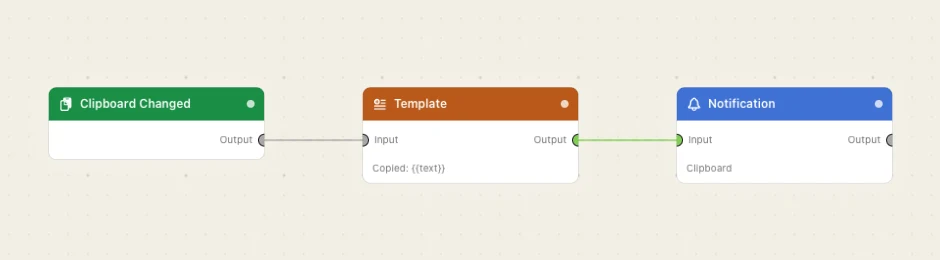
Paste this into the Flow Builder to get the same flow:
When I copy text, show me a notification with the first line of it.
Good to know
Copied images become real files. Image bytes only survive on the pasteboard until the next copy, so the trigger writes them as clip-20260820-140509-a1b2c3.png into the Clips folder inside Watchflows' own storage. Settings ▸ Storage shows that folder and can move it. To keep a clip beyond that folder, wire {{imagePath}} into a Move File or Copy step.
Only a pure image copy is saved. A selection from a web page carries text too, so it is a text copy — contentType stays text and nothing is written.
Your own flows do not loop. A Copy to Clipboard action does not re-trigger this node, so a clipboard manager that restores a clip will not store it all over again.
A failed write still fires. You really did copy something, so the flow runs with no imagePath at all and an imageError explaining why. Nothing invents a path to a file that is not there.