At a glance
- Fires when
- A photo is added to the Photos library
- Emits
- Working-copy path, name, extension, asset id, screenshot flag, creation date
- Needs
- Full Photos access
Set it up
The node watches the Photos library itself, not a folder on disk, so it sees photos that never land as loose files. macOS asks for Photos access the first time the flow arms.
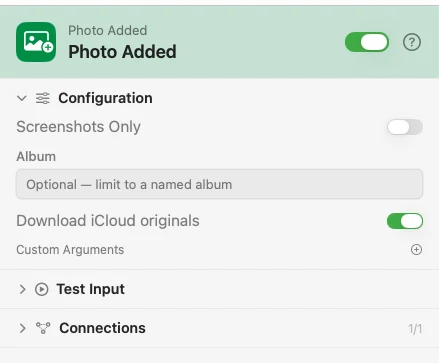
Configure
| Field | Default | What it does |
|---|---|---|
| Screenshots Only | Off | Fire only for photos the library marks as screenshots. |
| Album | — | Limit to photos added to one named album. |
| Download iCloud originals | On | When the original lives only in iCloud, fetch it so the flow gets real pixels. Off skips those photos — they fire with an empty filePath. |
| Custom Arguments | — | Extra key-value pairs merged into the payload. |
Output
Every key is available downstream as {{key}}.
| Key | Type | Value |
|---|---|---|
filePath | String | A temporary working copy of the original — empty when a cloud-only photo was skipped |
fileName | String | Name of the added photo |
fileExtension | String | Lowercased, no dot: heic |
assetIdentifier | String | The photo's library identifier — the stable handle to it |
isScreenshot | Boolean | Whether the photo is a screenshot |
localImageAvailable | Boolean | Whether a working copy was made; false for a skipped cloud-only photo |
creationDate | String | When the photo was created, ISO 8601 |
timestamp | String | When the trigger fired, ISO 8601 |
Example: keep a copy of every new photo
Photo Added hands over the working copy. Move File, set to Copy, puts it in ~/Pictures/Inbox. Notification confirms the filename.
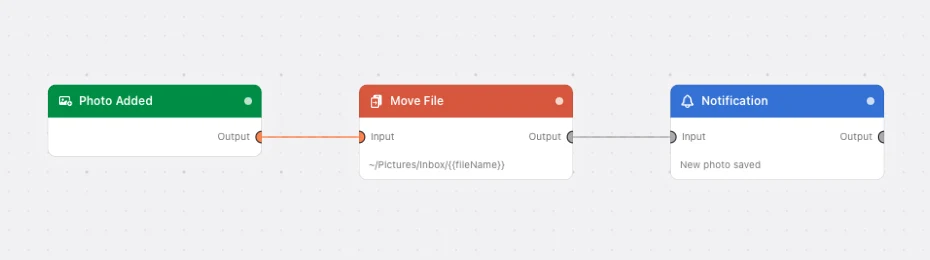
Paste this into the Flow Builder to get the same flow:
When a photo is added to my Photos library, copy it into ~/Pictures/Inbox and notify me which one it was.
Good to know
filePath is temporary. The working copy is swept up when the run ends. Wire in a Move File or Copy step for anything you want to keep.
Selected Photos is not enough. Limited access hides new photos from the app, so the trigger refuses to arm and says so. Grant full access in System Settings ▸ Privacy & Security ▸ Photos.
⌘⇧4 screenshots never reach the library. They land on the Desktop as ordinary files — point Directory Changed at that folder instead. Screenshots Only is for screenshots that did get into Photos, usually from an iPhone.