At a glance
- Two outlets
- Action carries the answer; Dismissed carries none of it
- Emits
- action, actionIndex, text, respondedAt, dismissedBy, title, body
Set it up
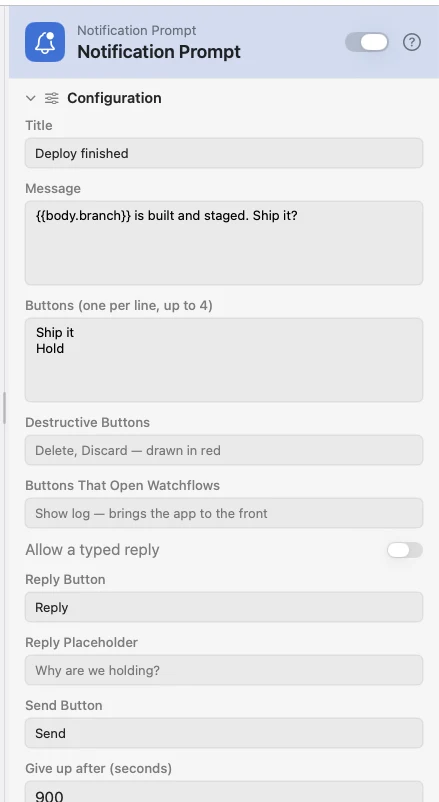
Write the title and message, put one button label per line, and decide how long to wait. Nothing opens and nothing takes focus — the question arrives the way any other app asks for your attention, and can be answered from another Space or from Notification Center later.
It is the lightest of the control surfaces: User Input, Form, Pick from List and HTML View all put a window on screen. And it is not Notification, which fires a banner and moves straight on — the waiting is the whole feature.
Configure
| Field | Default | What it does |
|---|---|---|
| Title | Watchflows | Supports {{var}}; falls back to "Watchflows" when it renders blank. |
| Message | — | The body. Supports {{var}}. |
| Buttons (one per line, up to 4) | — | Up to 4 labels — 3 with a typed reply on. Labels are used exactly as typed and are not interpolated, because macOS registers them before the payload exists. |
| Destructive Buttons | — | Comma-separated labels drawn in red. Each must match a line in Buttons. |
| Buttons That Open Watchflows | — | Comma-separated labels that bring the app forward when tapped. |
| Allow a typed reply | Off | Adds an inline reply field, opened from its own button. |
| Reply Button | Reply | The button that opens the field. |
| Reply Placeholder | — | The grey words inside the empty field. Supports {{var}}. |
| Send Button | Send | The button that sends what was typed. |
| Give up after (seconds) | 900 | Fifteen minutes. Clamped between 5 seconds and 24 hours; a value that is not a number is refused outright. |
Output
Each key belongs to exactly one outlet. Whichever fires, the other's keys are removed rather than left empty — so a chained pair of prompts can never leak an earlier answer.
| Key | Outlet | Value |
|---|---|---|
action | Action | The tapped button's label — or the Reply Button's label for a typed reply |
actionIndex | Action | Zero-based position of the button; -1 for a typed reply |
text | Action | What was typed, on a typed reply |
respondedAt | Action | ISO 8601 time of the answer |
dismissedBy | Dismissed | close — the × or Clear — or click, the notification's body |
title | both | The rendered title that was shown |
body | both | The rendered message that was shown |
There is no outlet per button. Wire a Compare behind Action and test {{action}} against each label — one node instead of a fan of wires.
Example: ask what to do when a deploy lands
A webhook reports the build, the prompt asks, and a Compare on {{action}} routes Ship it away from everything else.
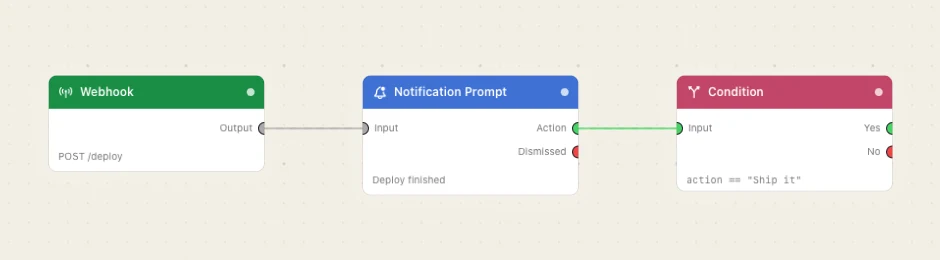
Paste this into the Flow Builder to get the same flow:
When my build webhook fires, ask me in a notification whether to ship it, with Ship it and Hold buttons, and branch on which one I press.
Good to know
Running out of time fails the node — it never takes Dismissed. A notification nobody saw is not someone declining to answer, so the run goes red in the log. Dismissed is reserved for a person actually closing it or clicking its body. A disabled node passes through Dismissed for the same reason.
Use Alert style for anything that must be answered. Banner style slides away after a few seconds — it stays in Notification Center with its buttons live, but the wait is then the only guaranteed way the node hears back. Alert style "None", or denied permission, fails the node immediately rather than waiting on something nobody could see.
Four actions is the ceiling, reply field included. macOS shows buttons on hover and folds two or more into an Options menu. The node refuses to run — before anything is posted — on a fifth action, a duplicate label, no way to answer at all, or a Destructive or foreground label that matches no button.
A very long title or message is shortened, not refused — 256 characters of title, 2,048 of message.