At a glance
- Does
- Extracts a .zip and fans out over its contents
- Emits
- destination, files, fileCount, success — and per file, filePath, fileName, index
- Works with
- Any readable .zip the flow can reach
Set it up
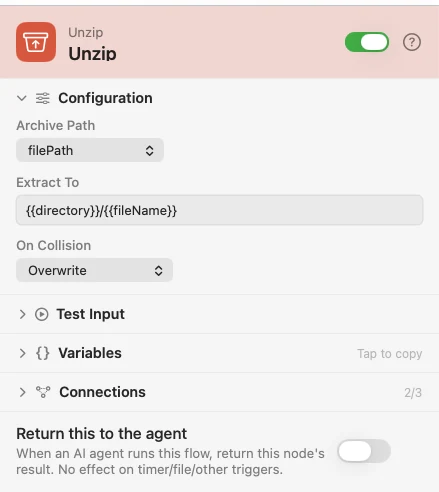
Archive Path is the .zip to extract — pick the upstream variable that holds it; blank falls back to filePath on the payload. Extract To defaults to a sibling folder next to the archive, which keeps the output out of a watched directory so the flow does not re-trigger on its own work.
One extraction feeds two outlets. Contents emits once with the whole archive — the destination folder, a files array, and fileCount — for a single "it's done" action. File fans out, running everything downstream once per extracted file with that file's filePath, fileName and index. A zip of 200 files is a document of 200 pages; wire whichever shape the rest of the flow wants.
Extraction lands in a private temporary folder first. Every entry is checked to stay inside it and symlink entries are rejected, so a malicious archive is caught and discarded before anything reaches the destination you named.
Configure
| Field | Default | What it does |
|---|---|---|
| Archive Path | {{filePath}} | The .zip to extract. |
| Extract To | {{directory}}/{{fileName}} | Where the contents go. |
| On Collision | Overwrite | Overwrite, Keep both (suffix), or Skip existing. |
Output
Every key is available downstream as {{key}}.
| Key | Type | Value |
|---|---|---|
destination | String | Contents outlet: the extraction folder |
files | Array | Contents outlet: a file ref for every extracted file |
fileCount | Number | Contents outlet: how many files came out |
filePath | File | File outlet: this file's absolute path |
fileName | String | File outlet: this file's name |
index | Number | File outlet: this file's position in the archive, from 0 |
success | Boolean | Both outlets. false on a graceful failure — see below |
Example: describe every image in an archive
Directory Changed catches the archive. Unzip fans out over its contents. A Condition keeps the PNGs. An AI node with a vision model describes each one.
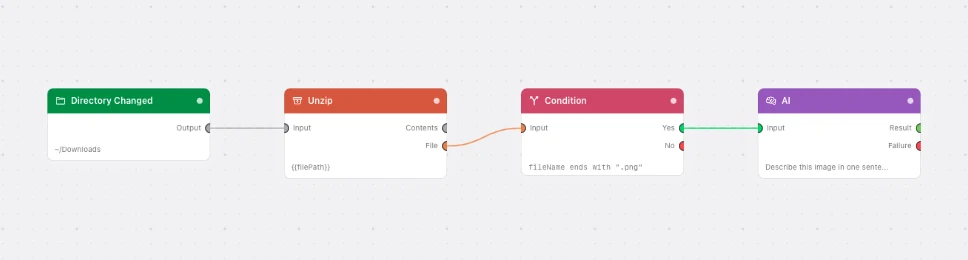
Paste this into the Flow Builder to get the same flow:
When a zip lands in my Downloads, unzip it and have a vision model describe every PNG inside.
Good to know
Everyday problems come back as success: false, not a failed run. no_archive_path, archive_not_found and not_a_zip arrive on error with a single payload — not a fan-out — so a Condition can route them.
Only a real safety violation stops the run. A protected archive or destination path, a .. escape, or an entry that tries to escape the extraction folder — including any symlink entry — throws and discards the whole extraction. iCloud Drive and the other cloud folders are allowed.