At a glance
- Does
- Renames one file in its own folder
- Emits
- sourcePath, destPath, fileName, fileSize, renamed
- Works with
- Any file the flow can reach
Set it up
The source comes from filePath on the incoming payload. You supply the name. Base Name is a template — {{date}}-{{fileName}} — and path separators in it are stripped, because this is a name, not a path: a rename can never move a file out of its folder.
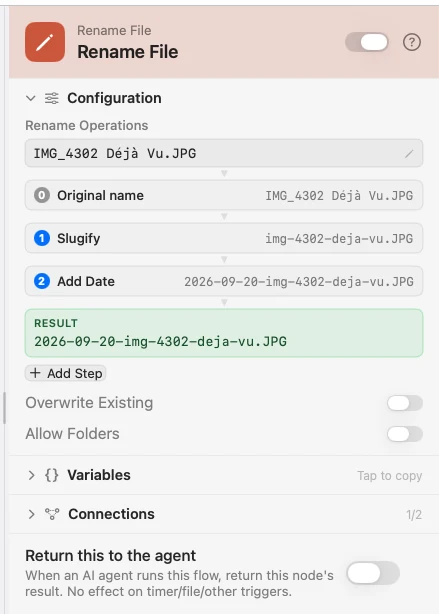
For anything beyond one template, add Rename Operations — an ordered stack applied top to bottom after the template renders. The extension is split off before the stack runs and re-attached at the end, so a Truncate or a Slugify can never eat the .pdf. Leave Base Name empty and the stack starts from the file's own name.
The inspector draws the stack as a pipeline: an editable sample at the top, the name as it exists after each step, and the final result at the bottom, all recomputed as you type.
The operations
| Operation | What it does |
|---|---|
| Insert Text | Puts text at the start, the end, or an index. Supports {{variable}}, including dotted paths like {{exif.dateTakenCompact}}. |
| Add Date | Joins today's date, or the file's created or modified date, in a format you pick. |
| Parent Folder | Joins the containing folder's name, e.g. Downloads-report.pdf. |
| Change Case | UPPERCASE, lowercase or Capitalize, on the base name only. |
| Slugify | kebab-case or snake_case: folds accents, lowercases, collapses punctuation. |
| Extension Case | Changes the extension's case only, .JPG to .jpg. |
| Truncate | Deletes characters from the start or the end. |
| Find & Replace | Replaces every literal occurrence. Both fields take {{variable}}. |
| Regex Replace | Replaces matches; the template supports $1 capture groups. The pattern is never interpolated, so payload values cannot inject regex. |
Configure
| Field | Default | What it does |
|---|---|---|
| Base Name (template) | — | The new name, before the operations run. Empty starts from the original name. |
| Rename Operations | empty | The ordered stack. Empty means template-only. |
| Overwrite Existing | Off | Off auto-numbers a collision (report-1.pdf); on replaces the file. |
| Allow Folders | Off | Let the source be a folder instead of a single file. |
Output
Every key is available downstream as {{key}}.
| Key | Type | Value |
|---|---|---|
sourcePath | String | The path before the rename |
destPath | File | The path after it |
fileName | String | The new name |
fileSize | Number | Size in bytes |
renamed | Boolean | True on a real rename; false for a no-op |
Example: date-stamp every screenshot
Photo Added fires on screenshots only. Rename File slugifies the name, then stamps the file's creation date on the front.
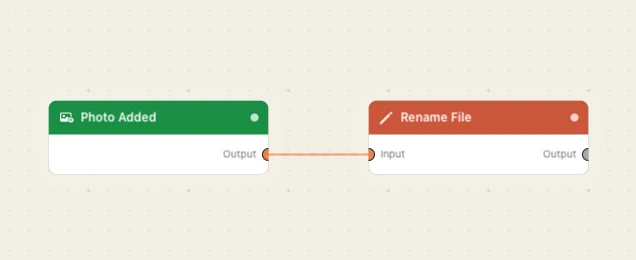
Paste this into the Flow Builder to get the same flow:
When I take a screenshot, rename it to the date followed by a slugified version of its name.
Good to know
Allow Folders widens the blast radius. These nodes act on one file: a folder as the path is refused until you turn Allow Folders on, and then the whole tree goes with it. Your home folder and its top-level folders — Desktop, Downloads, Documents, Pictures, Movies, Music — are never a source, toggle or not; a file inside one is ordinary. A package like .app counts as a file either way.
Overwrite replaces a file that cannot be recovered. Off is the default and auto-numbers instead, which is almost always what you want. A flow with it on asks for confirmation every time it is armed. A folder already at the new name is never removed — the rename fails instead.
Order matters in the stack. Slugify-then-insert and insert-then-slugify give different names. The pipeline view shows exactly where each step lands before the flow ever fires.