Turn it on
Open Settings ▸ AI Agents and flip Enable AI Agents. Until you do, nothing listens and nothing is shared. The switch starts a Model Context Protocol server bound to 127.0.0.1 on port 52916, which admits a request only when the Host header names loopback, there is no Origin header at all, and the bearer token matches.
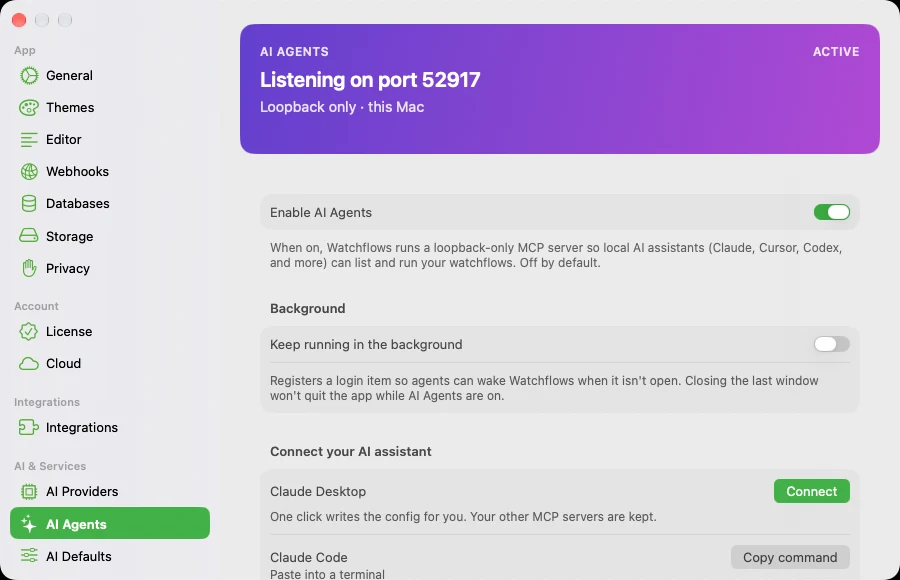
Connect your AI assistant carries a snippet per client — Claude Desktop (one click, your other MCP servers untouched), Claude Code, Cursor, Windsurf, Codex, VS Code. You never paste the token: each snippet holds only the path to the watchflows-mcp shim in the app bundle, and the shim reads the token off its own 0600 file.
Expose a flow
Turning AI Agents on hands over nothing by itself. Each flow has its own Expose to AI agents switch, off by default, in the Exposed workflows list or the flow's inspector. A flow runs for an assistant only when it is both enabled and exposed.
Read tools still see everything, so the assistant knows what exists — list_workflows marks each flow agentRunnable. An unexposed flow has no run tool and the gate refuses it. A flow holding a destructive node uses that same switch; only the refusal names the risk first.
What the assistant calls
Every exposed flow becomes its own named tool, alongside five core ones: list_workflows, describe_workflow, run_workflow, get_run, and list_runs. They read and run — nothing here creates, edits, or enables a flow.
| Entry trigger | Argument | Type |
|---|---|---|
| Input · Text or Prompt | text | string |
| Input · JSON | data | object |
| Input · File or Folder | filePath | string |
| Form | one per field | per field |
| Any other trigger | payload | object |
Call describe_workflow for the exact contract. A value the assistant supplies replaces your saved one; omit it and the flow runs on the default you tested with.
A completed run answers inline with output plus an output_source naming where that value came from: explicit:<node> when you set Return this to the agent, auto:<node> for a single end node, or a none: / ambiguous: marker when there is nothing to pick. The inline value is capped at 16 KB and a spilled blob shows as a marker — get_run has the full record.
Good to know
A run past 60 seconds is not a failure. It keeps going in the background and answers running with a run_id; a second call gets already_running. Poll get_run rather than re-calling.
The token survives relaunches. It is minted on first run and kept across restarts and app updates so connected clients don't drop. Rotate, under Advanced beside the port, is the only thing that replaces it — and every client then has to reconnect.
The Agent node is a different feature. Agent is a tool-using worker inside one flow, with its own Max Iterations (25 by default) and File Access Scope. AI Agents is about assistants outside Watchflows calling in.