At a glance
- Does
- Appends a line, creating the file if it is not there
- Emits
- logFile, linesWritten, written
- Works with
- Audit trails, event logs, anything you will read back later
Set it up
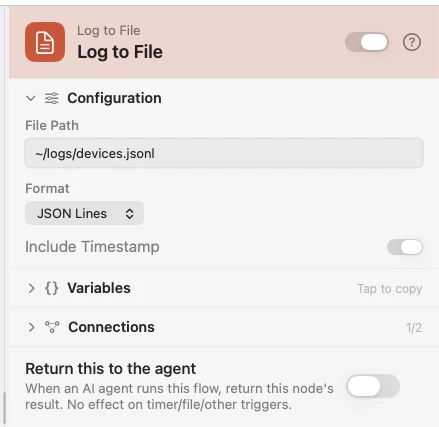
Give it a File Path and pick a Format. JSON Lines writes the payload as one object per line, stamped when Include Timestamp is on. Plain Text renders the Line Template you write. CSV writes the values as a row. The file is created on first write, and each run appends exactly one line.
Configure
| Field | Default | What it does |
|---|---|---|
| File Path | — | The log file, e.g. ~/logs/events.jsonl. |
| Format | JSON Lines | JSON Lines, Plain Text, or CSV. |
| Line Template | — | Plain Text only: the line to render, e.g. {{timestamp}} [{{event}}] {{deviceName}}. |
| Include Timestamp | On | JSON Lines only: add an ISO 8601 stamp to each line. |
Output
Every key is available downstream as {{key}}.
| Key | Type | Value |
|---|---|---|
logFile | String | Absolute path to the log file |
linesWritten | Number | How many lines the file now holds |
written | Boolean | Whether the line was written |
Example: keep a record of every device that connects
Device Event fires on USB connect. Log to File appends a JSON line with the device name and the time.
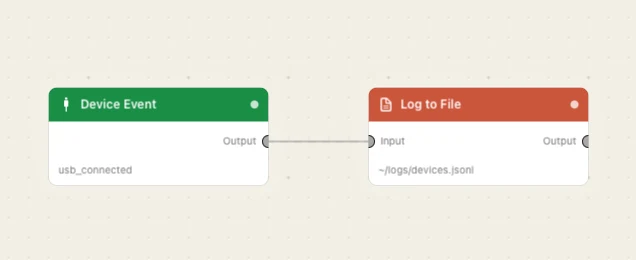
Paste this into the Flow Builder to get the same flow:
Whenever a USB device connects, append a line to ~/logs/devices.jsonl with its name and the time.
Good to know
It only ever appends. There is no overwrite mode — rotate the file yourself with a Move File step on a schedule.
To read a log back, use File Log. File Log tails a file on the canvas so you can watch it fill while a flow runs.