At a glance
- Takes
- An image path on the payload
- Emits
- extractedText, ocrConfidence, ocrLineCount, success
- Good for
- Screenshots, receipts, scanned pages, anything with words in it
Set it up
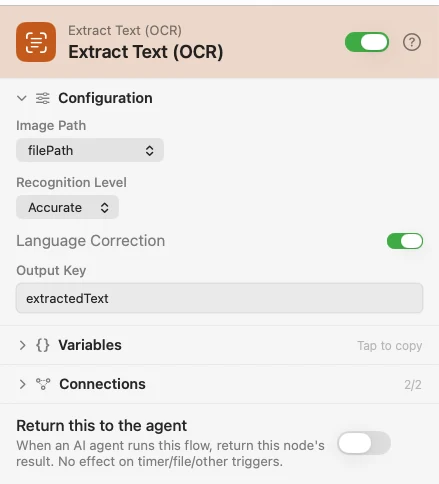
Point Image Path at the upstream file — {{filePath}} from a Photo Added or Directory Changed trigger, or any image path on the payload. The recognized text is merged onto the payload, so a later node can still act on the image itself.
Configure
| Field | Default | What it does |
|---|---|---|
| Image Path | {{filePath}} | The image to read. |
| Recognition Level | Accurate | Fast trades accuracy for speed. |
| Language Correction | On | Dictionary-based correction. Turn it off for codes, SKUs and serial numbers, where correction hurts. |
| Output Key | extractedText | Where the recognized text lands. |
Output
Every key is available downstream as {{key}}.
| Key | Type | Value |
|---|---|---|
extractedText | String | The recognized text. Renamed by Output Key |
ocrConfidence | Number | Average per-line recognition confidence |
ocrLineCount | Number | How many lines were recognized |
success | Boolean | false when the image was missing, blocked, or still in iCloud |
error | String | On failure only — which of those it was |
Example: read a screenshot
Input picks an image file. Extract Text (OCR) reads it. Log prints {{extractedText}}.
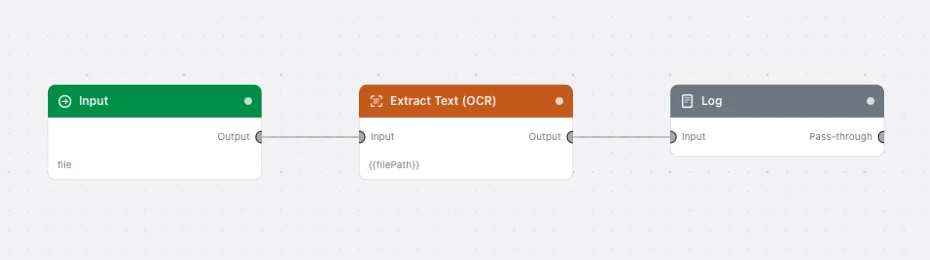
Paste this into the Flow Builder to get the same flow:
Let me pick an image with an Input trigger, run OCR on it, and log the text it found.
Good to know
A failure is a payload, not a stopped run. A missing file, a denied Photos permission, or an iCloud original that isn't on this Mac yet all come back as success: false with an error — branch on it with a Condition rather than expecting the flow to halt. A transient iCloud failure is also marked transient: true.
Photos access must be full. With Photos set to Limited rather than Full Access, the node refuses before any recognition runs, so a partial library can't quietly return nothing.
A photo whose bytes are still in iCloud is downloaded first when the payload carries its assetIdentifier, so the text comes from the original rather than a degraded copy.