Two kinds of destructive
Move to Trash and Delete File are destructive by identity. Removal is their whole purpose, so they wear the red treatment however you configure them.
Everything else earns it from its settings: Run Script containing rm, sudo or dd if=; API Request set to DELETE; Write File in Overwrite mode; Move File or Rename File with Overwrite on; Simulate Key Press bound to ⌘Q, ⌘W or Delete; Update in Database, Delete from Database and Run SQL; an Agent or Chat node with a destructive tool switched on. Undo the setting and the red goes away.
API Request flags DELETE and nothing else. A POST or PUT can destroy just as much on the far end. Watchflows cannot tell from the outside, so it does not pretend to.
Where you see it
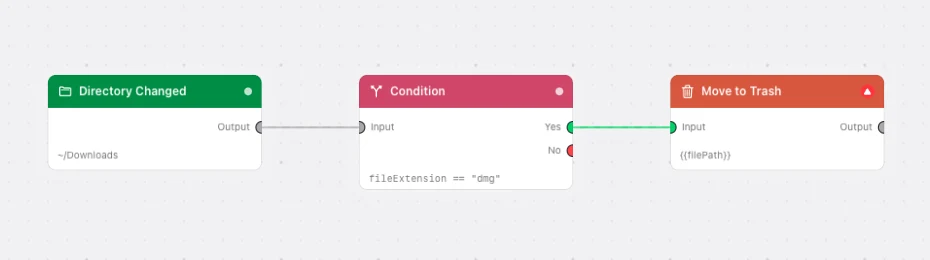
- Canvas — a red badge with a white triangle in the card's header, standing where the accent dot would be.
- Node library — only the two identity-destructive nodes are tinted, so nothing is branded dangerous before you configure it.
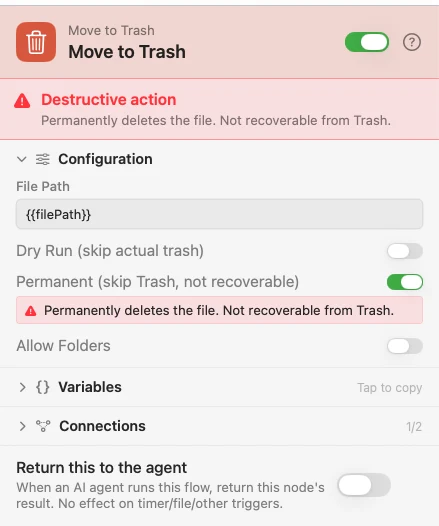
- Inspector — a red banner above the node header, and a red hint row under the setting that caused it. Neither blocks editing.
- Toolbar — while the flow is armed, a red triangle whose tooltip names the nodes.
Arming asks every time
Arming a flow with any destructive node pops a confirmation listing each one by name and why it qualifies. Switch On Anyway switches it on, Cancel leaves it off. There is no "don't ask again" — disarm and re-arm and you see it again.
Files and folders
Move File, Rename File, Move to Trash and Delete File act on one file. Hand one a folder and it refuses; turn on Allow Folders to mean it on purpose. A package such as .app or .numbers counts as a file either way, because that is what Finder shows you.
Your home folder and its top-level folders — Desktop, Downloads, Documents, Pictures, Movies, and Music — are never accepted as a source on those four nodes, with Allow Folders on or off. A file inside one of them, such as a PDF in Downloads, is an ordinary source.
Removal defaults to recoverable. Move to Trash routes through the macOS Trash. Its Permanent toggle and Delete File are the opt-in one-way doors.
Sweeps
A sweep runs a flow over files already in a folder. When you preview one, committing makes exactly the changes you left checked — nothing runs a second time.
Undo sweep puts moves, renames, and Move to Trash back. A permanent delete, an overwrite, or a copy can't be undone — the same as outside a sweep.
Flows from elsewhere
A .watchflow file macOS has quarantined — downloaded, emailed, AirDropped — is inspected before it opens, as is anything you install from Community Flows. If it holds node types that can destroy, you get a count per type and the chance to back out. Flows you wrote here open straight through.