Watchflows watches your Mac for something happening — a file landing in a folder, a time of day, a keyboard shortcut, an incoming webhook — and runs the chain of nodes you wired to it. Everything runs on this Mac, with no account needed. Bring your own language model, or try ours free with 2,000 Sparks.
Start here
- Download Watchflows from watchflows.app, unzip it, and drag it to Applications.
- Make a flow. Click New Flow, drag a trigger out of the node palette on the left, then drag the actions that should follow it and wire them together.
- Turn it on. Press Run (⌘R) to try it by hand, then flip Enabled in the toolbar so it fires on its own.
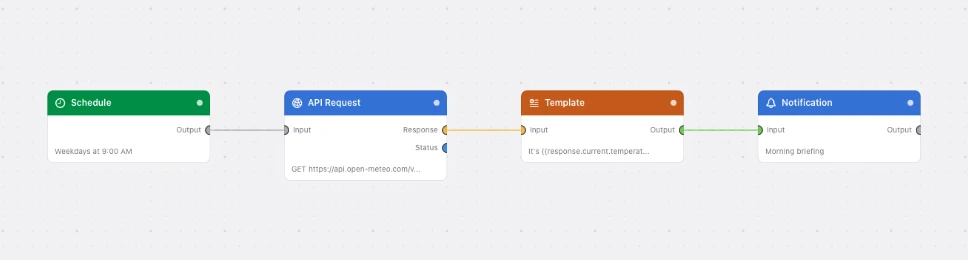
Getting Started walks all of that end to end and leaves you with a flow that works.
The nodes
Every flow is nodes on a canvas. There are ten categories.
| Category | What it does |
|---|---|
| Triggers | Start a flow when something happens — a file changes, an app opens, a timer fires |
| Actions | Do something on your Mac — run scripts, show notifications, call APIs, control apps |
| AI | Use a language model to classify, transform or analyse your data |
| Apple | Reach into built-in Apple apps — Notes, Reminders, Calendar, Music |
| Files | Work with files and folders — move, rename, zip, write, delete |
| Databases | Keep your own rows in a local database — save, find, change, remove |
| Transformers | Reshape data as it flows — extract, format, combine, loop |
| Conditions | Branch the flow — route the payload down Yes or No based on a comparison |
| Emitters | Stream system measurements into a flow on an interval — CPU, memory, disk, battery |
| Utilities | Helpers for the rest of the flow — delays, logs, breakpoints, charts |
Browse the full node reference.
The ideas behind it
| Read this | To understand |
|---|---|
| Payloads | The data that travels between nodes, and {{key}} interpolation |
| Port Types | Which outlets can connect to which inlets |
| Execution Model | What order nodes run in, and what happens when one fails |
| Set Up AI | Getting a working AI model and building your first flow with it |
| AI Providers | Pointing Watchflows at a local model, an API key, or a CLI you already pay for |
| Flow Builder | Describing a flow in plain English and watching it get built |
| Destructive Actions | How nodes that delete or overwrite are held back until you say so |
The app links straight back here. Help ▸ Open Documentation (⇧⌘?) opens this page, Help ▸ Node Reference opens the node list, and the ? in any node's inspector opens that node's page.